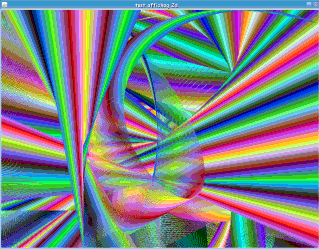

There’s sometime ago I wanted to see how java 2D was working.
I came from Amiga computers, where doing double buffering was part of your job in C. But using accellerated 2D java engine seems a lot simpler as it do the job for you ;)
Below is a little java class I coded to experiment java 2D with double buffering.
It may be wrong now since this code is quite old and its also a lot slower than the same code on an Amiga 4000 using C language.
    import javax.swing.*;

    import java.awt.*;

    import java.awt.image.*;

    import java.awt.event.*;

    // main window

    public class MainWindow extends Canvas

    {

      /* The stragey that allows us to use accelerate page flipping */

      private BufferStrategy strategy;

      // constructor

      public MainWindow()

      {

        // create window

        JFrame container = new JFrame("Java 2d test");

        // get hold the content of the frame and set up the resolution of the game

        JPanel panel = (JPanel) container.getContentPane();

        panel.setPreferredSize(new Dimension(800,600));

        panel.setLayout(null);

        // setup our canvas size and put it into the content of the frame

        setBounds(0,0,800,600);

        panel.add(this);

        // Tell AWT not to bother repainting our canvas since we're

        // going to do that our self in accelerated mode

        setIgnoreRepaint(true);

        // finally make the window visible

        container.pack();

        container.setResizable(false);

        container.setVisible(true);

        // add a listener to respond to the user closing the window. If they

        // do we'd like to exit the game

        container.addWindowListener(new WindowAdapter() {

          public void windowClosing(WindowEvent e) {

            System.exit(0);

          }

        });

        addKeyListener(new keyhandler());

        // get focus to receive key events

        requestFocus();

        // create the buffering strategy which will allow AWT

        // to manage our accelerated graphics

        createBufferStrategy(2);

        strategy = getBufferStrategy();

        // start

        Draw();

      }

      public void Draw()

      {

        int j = 0 , i = 0, r = 255,g = 255, b=255, mr = -1,mg = -1,mb = -1;

        int endw = 800, endh = 600, mw=1, mh = -1;

        // Get hold of a graphics context for the accelerated

        // surface and blank it out

        Graphics2D gfx = (Graphics2D) strategy.getDrawGraphics();

        gfx.setColor(Color.black);

        gfx.fillRect(0,0,endw,endh);

        gfx.setColor(Color.white);

        while(true)

        {

          gfx.setColor(new Color(r,g,b));

          gfx.drawLine(i,j,endw-i,endh-j);

          //gfx.draw3DRect(i,endh,i,endw,false);

          gfx.drawArc(i, j, endw, endh, 45-i, 90+j);

          // finally, we've completed drawing so clear up the graphics

          // and flip the buffer over

          //g.dispose();

          strategy.show();

          if(i < 800) i++;

          else

          {

            j++;

            if(j > 600)

            {

              j = 0;

              i = 0;

            }

          }

          r = r + (2*mr);

          g = g + (5*mg);

          b = b + (10*mb);

          if(r <= 5) mr = 1;

          else if(r >= 250) mr = -1;

          if(g <= 5) mg = 1;

          else if(g >= 250) mg = -1;

          if(b <= 5) mb = 1;

          else if(b >= 250) mb = -1;

          endw+=mw;

          endh+=mh;

          if(endw >= 1200) mw = -1;

          else if(endw <= 300) mw = 1;

          if(endh >= 900) mh = -1;

          else if(endh <= 50) mh = 1;

          try { Thread.sleep(1); } catch (Exception e) {}

        }

      }

      private class keyhandler extends KeyAdapter

      {

        public void keyTyped(KeyEvent e)

        {

          System.exit(0);

        }

      }

      // main function

      public static void main(String[] args)

      {

        new MainWindow();

      }

    }