My home lab was 7 years old and it was time to replace it. It was based on five Odroid HC1 nodes and 1 Odroid N1 (which never reached the mass production stage, Hardkernel sent it to me as a gift for a debug party). 4 HC1 nodes were used for a Docker Swarm cluster and 1 was dedicated to Nginx as a reverse proxy / WAF / SSL offloader. Regarding the Odroid N1, it was used as a NAS and also as a saltstack master.
Everything has been replaced with a major upgrade: faster infrastructure, better power efficiency, GitOps approach, virtualized environments, Kubernetes cluster, improved Saltstack implementation and last but not least: everything can be built automaticaly from scratch using PXE and the help of custom scripts !
This is the (very long) story of my new homelab build…
Concept: the big picture
Before diving into all the details, I think it is important to understand what was goind through my mind, the concept I tried to implement (and hopefully succeeded in doing so).
I’m not saying that it is the best approach. After all, it’s a homelab,which, to me, means a way to learn, have fun, express creativity, and, of course, self-host some services.
Simplified GitOps approach
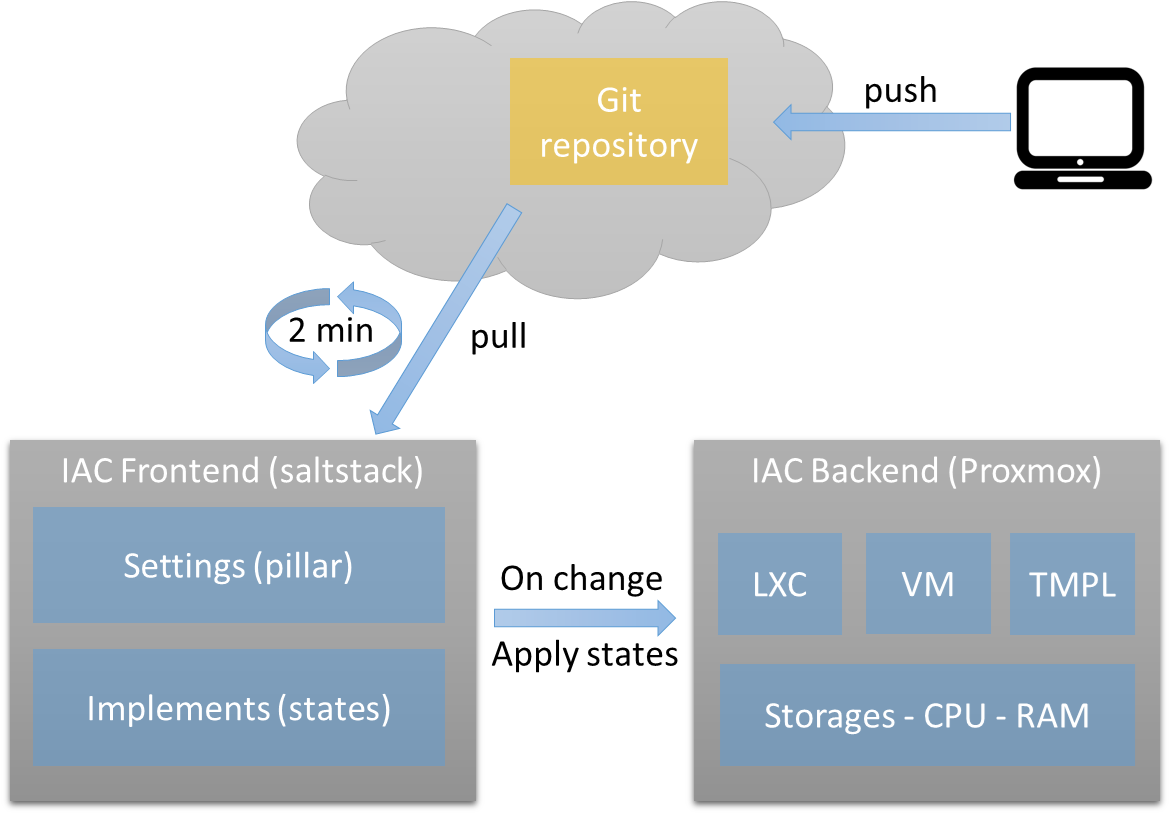
I did not use any CI/CD components, no branches (at least for now), but the bare minimum for Infrastructure as Code is in place:
- 100% “as code” infrastructure
- Git repository
- IaC frontend through Saltstack
- IaC backend implementation with Proxmox VE
Infrastructure overview
A homelab comes with certain constraints that sometimes prevent you from making the best technical choices. For me, the main concerns were:
- Money: Obviously, resources are limited and must be optimized based on what you want or need to achieve.
- Space: Hardware takes up room, can be noisy, etc.
- Power consumption: For hardware running 24/7, this can be a real game-changer for the annual electricity bill.
- Ease of replacement: How easily things can be replaced in case of failure, as I don’t have tons of free time!
Hardware
In this homelab revision, I chose x86 hardware over ARM. The Intel N100 is a powerhouse in terms of performance, efficiency, and price. Not to mention that it offers far greater expansion options than ARM SBCs, especially when it comes to RAM and virtualization support.
Devices
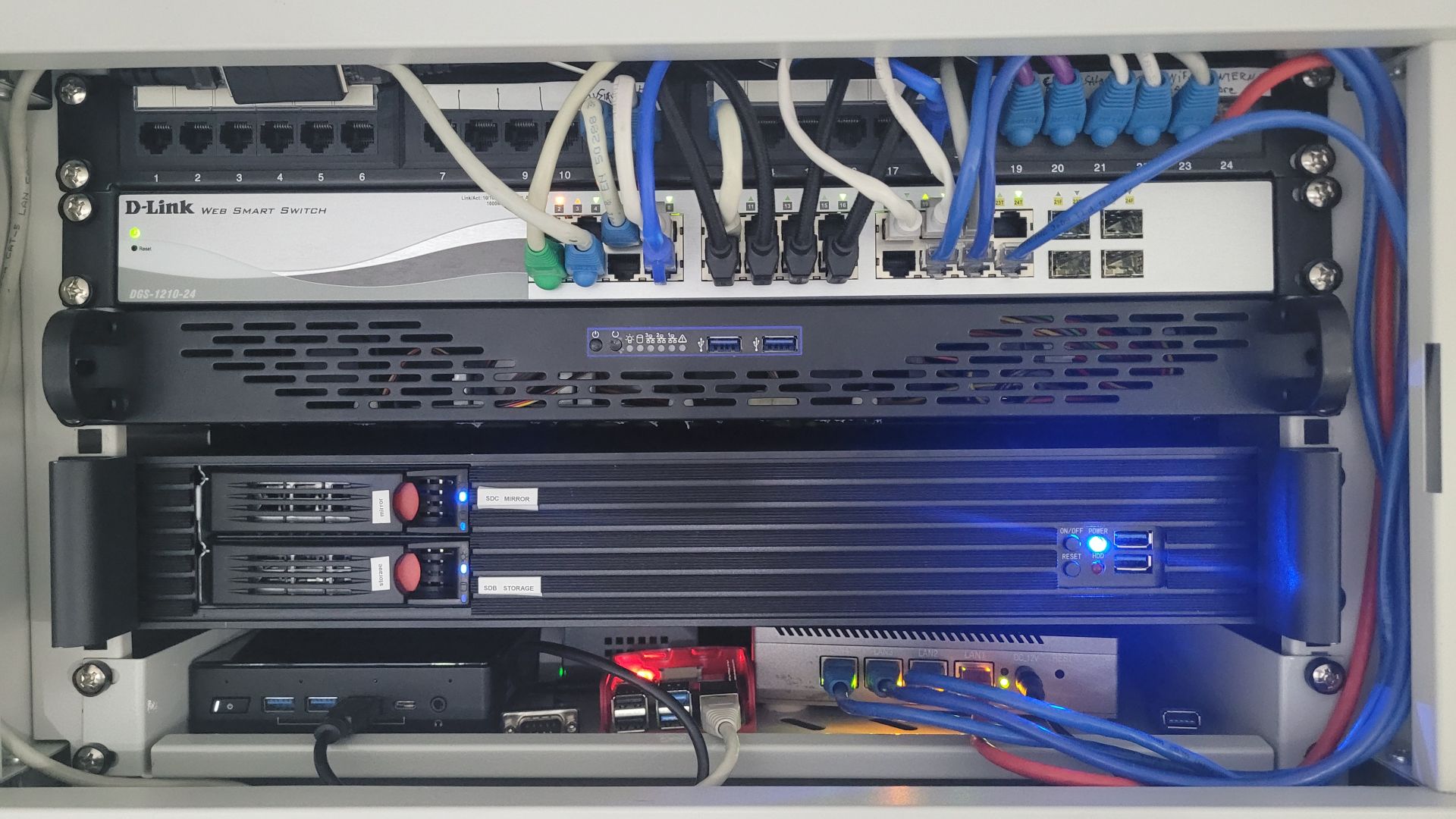
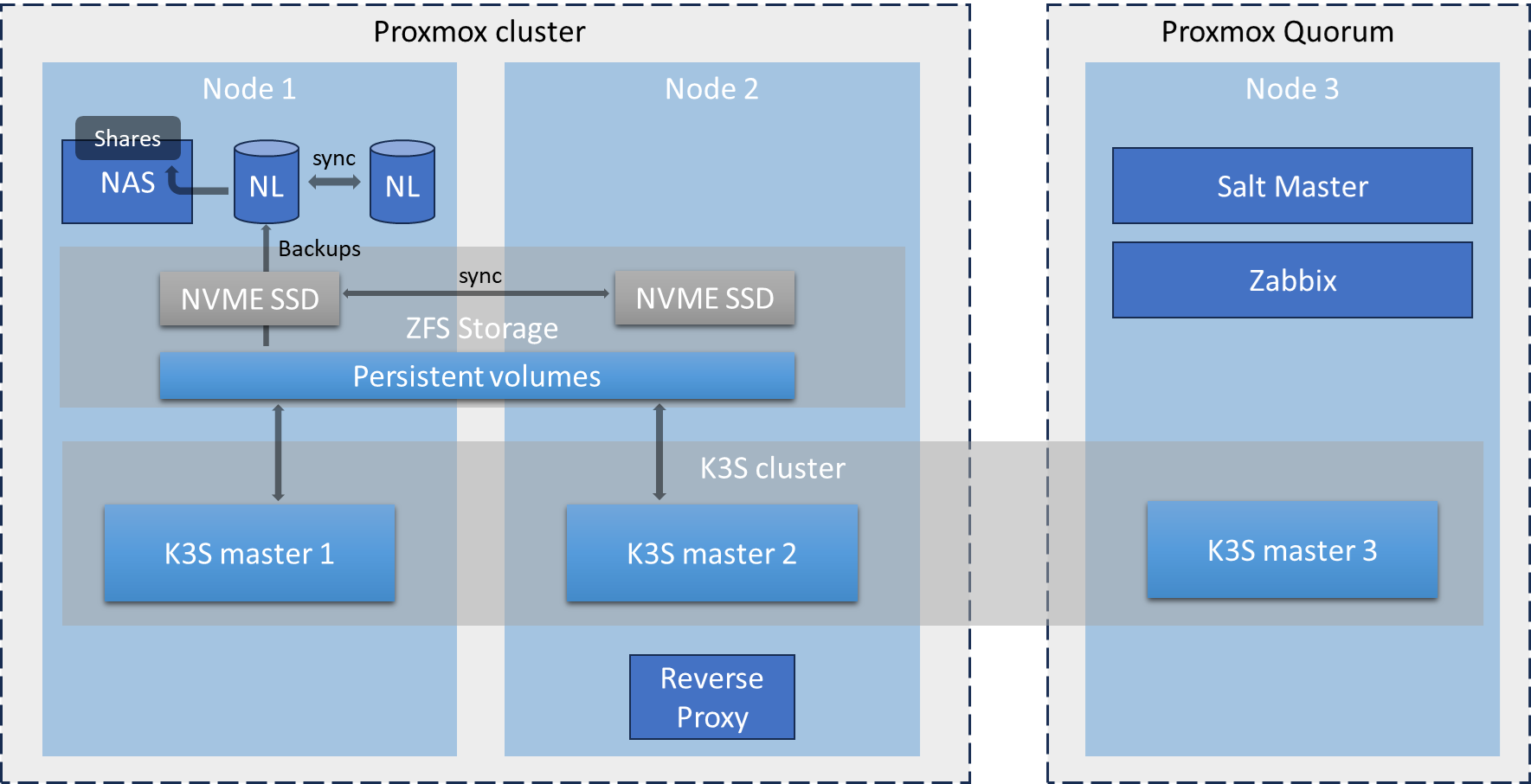
Basically, my “cloud@home” setup consists of two Intel N100 nodes and one N6000 (Liva Z3). Since I have a small, wall-mounted 19" rack with a depth of 30 cm, I decided to build custom servers using rack enclosures.
Below is the list of components I used:
| Item | Quantity | Comments |
|---|---|---|
| Intertech 1.5U-1528L | 1 | Case for Node-1. A surprisingly good enclosure for the price: only 1.5U in height, with two externally accessible 3.5″ bays for SATA drives. It supports a Mini-ITX motherboard and has a depth of 27.8 cm. |
| Intertech IPC 1HU-K-125L | 1 | Case for Node-2. Similar to the previous one but with a 1U height and no externally accessible 3.5″ bay. |
| Fortron FSP250-50FEB | 2 | A 250W Flex ATX power supply with up to 85% efficiency—useful for a setup running 24/7. |
| ASUS Prime N100I-D D4-CSM | 2 | Mini-ITX motherboard with an integrated N100 processor. I found it to have a good balance of features and price. |
| 32Gb Kingston FURY Impact, DDR4 3200 SO-DIMM | 2 | Contrary to the official specs, the N100 is not limited to 16GB of RAM—it works perfectly with 32GB. |
| Kingston NV2 – 1Tb | 2 | Used for virtual machines and container storage. Offers good performance and capacity for the price. More than enough for my home lab. |
| SATA SSD kingston kc600 256Gb | 2 | Boot disks and /root storage for Proxmox on both Node-1 and Node-2. |
| Uni USB 3.0 to 2.5Gbps ethernet adatpter. | 4 | The ASUS motherboard has only a single gigabit NIC, which was too limiting for my needs. Adding two additional ports allows for bonding (LACP) plus a dedicated 2.5G node-to-node connection for the replication network and Corosync. I initially tried dual-port PCIe cards, but none worked properly (r8123, r8125, Intel 82571, and Intel i225-V). |
| JMB582 based SATA 3 M.2 controller with 2 ports (Key A + E) | 1 | Used to connect the two hard drives for the NAS VM. I could have used a PCIe card, but the only available slot was initially occupied by a network card… well, initially. |
| Seagate HDD 8Tb Sata 3 | 2 | Used with the JMB582 controller for NAS storage. |
| Liva Z3 – 128 Gb | 1 | Used as Node-3 for Proxmox quorum, Salt Master, Zabbix monitoring, and a third Kubernetes node (mainly to improve etcd cluster stability). |
| Kingston fury DD4 3200 8Gb | 2 | 16GB dual-channel RAM for the Liva Z3. |
| Patriot P400 Lite 250 Gb | 1 | Low-power PCIe M.2 SSD for the Liva Z3 |
Bios settings
I did some BIOS “tweaking” mostly to save power and to allow for PXE boot on all nodes (including wake-on-lan activation)
Asus Prime N100I-D
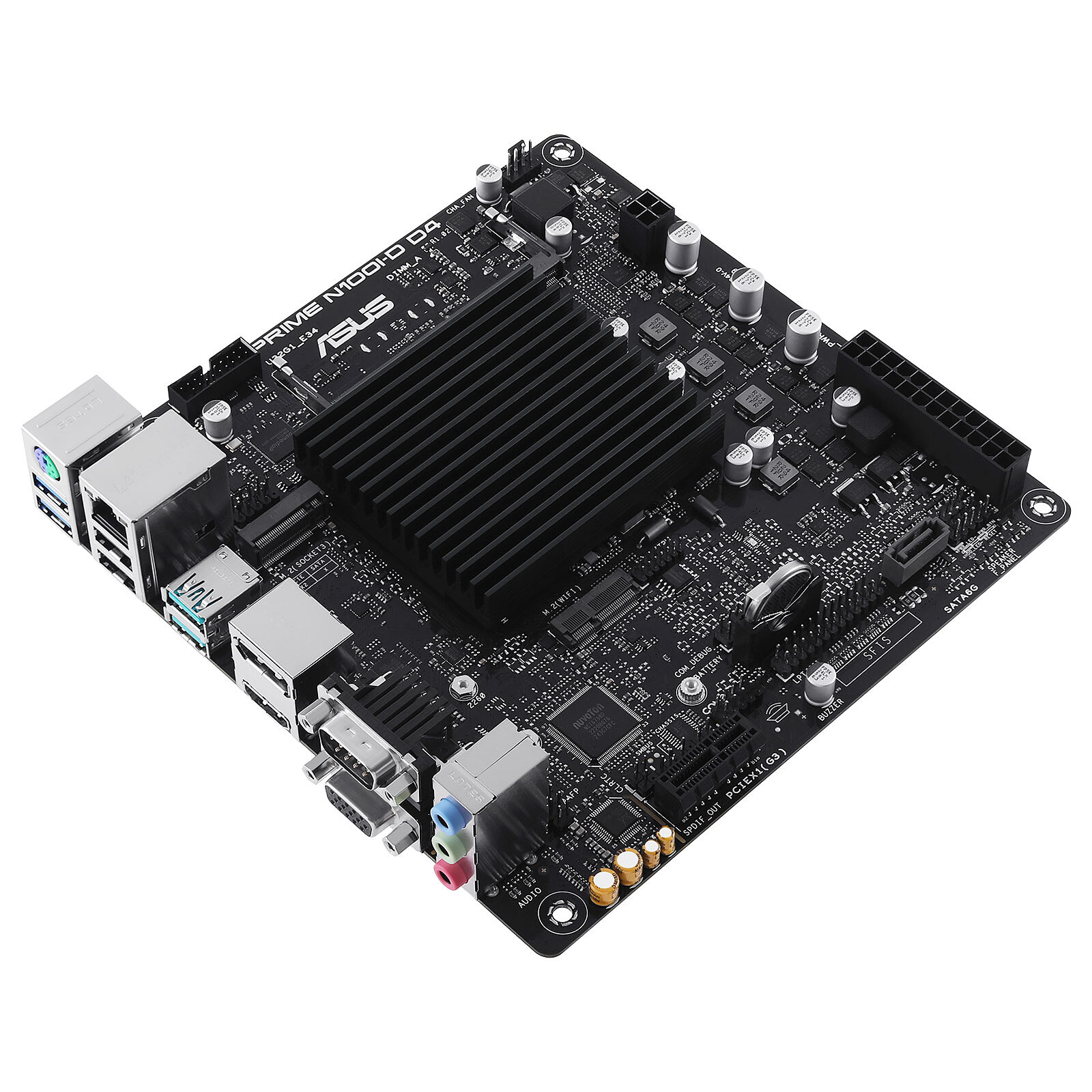
Here are the settings for the two N100 nodes:
- dvmt graphic memory set from 64 to 32 : no video memory needed for a headless server
- enabled sr-iov support for better offloading on NIC
- disabled all usb port but usb_3, usb_4, u32g1_e3 and u32g1_e4 which are the one mounted on the face and the one used for the etherner adapters.
- enabled network stack, ipv4 PXE and set PXE boot as first priority (can be done only after a reboot)
- set restore AC power loss to last state in case of power failure, so it will be powered back on
- enabed wake-on-lan (which is called “power on by pci-e”) so I could turn on my servers from pfsense easily
- disabled hdaudio, not needed, save power
- disabled wifi and bluetooth. Through, there are no such functionnalities installed
- disabled serial and parallel ports, save power
- enabled XMP as the memory I use support it. It might set timings to better ones, can’t hurt.
- Disable fast boot : server’s are not willing to reboot a lot and I prefer letting all hardware checks to be done when I reboot it
- enabled native aspm for power saving
Liva z3

- Power management / resume via PME : mandatory to allow wake-on-lan
- Disabled ACPI sleep state: I don’t need and don’t want it to be able to sleep as a 24/7 server
- Wireless function : disabled wifi and bluetooth, I do not need then and it can save power
- System agent configuration: set all memory values to mininum as it will be a headless machine, no need for GPU memory
- PCH configuration: disabled audio (not needed + power save), set restore AC power lost to power on
- Boot / network stack: enabled (wol), disabled quiet boot and set boot order to “usb, network, harddisk”
- disabled EUP else wake-on-lan won’t work
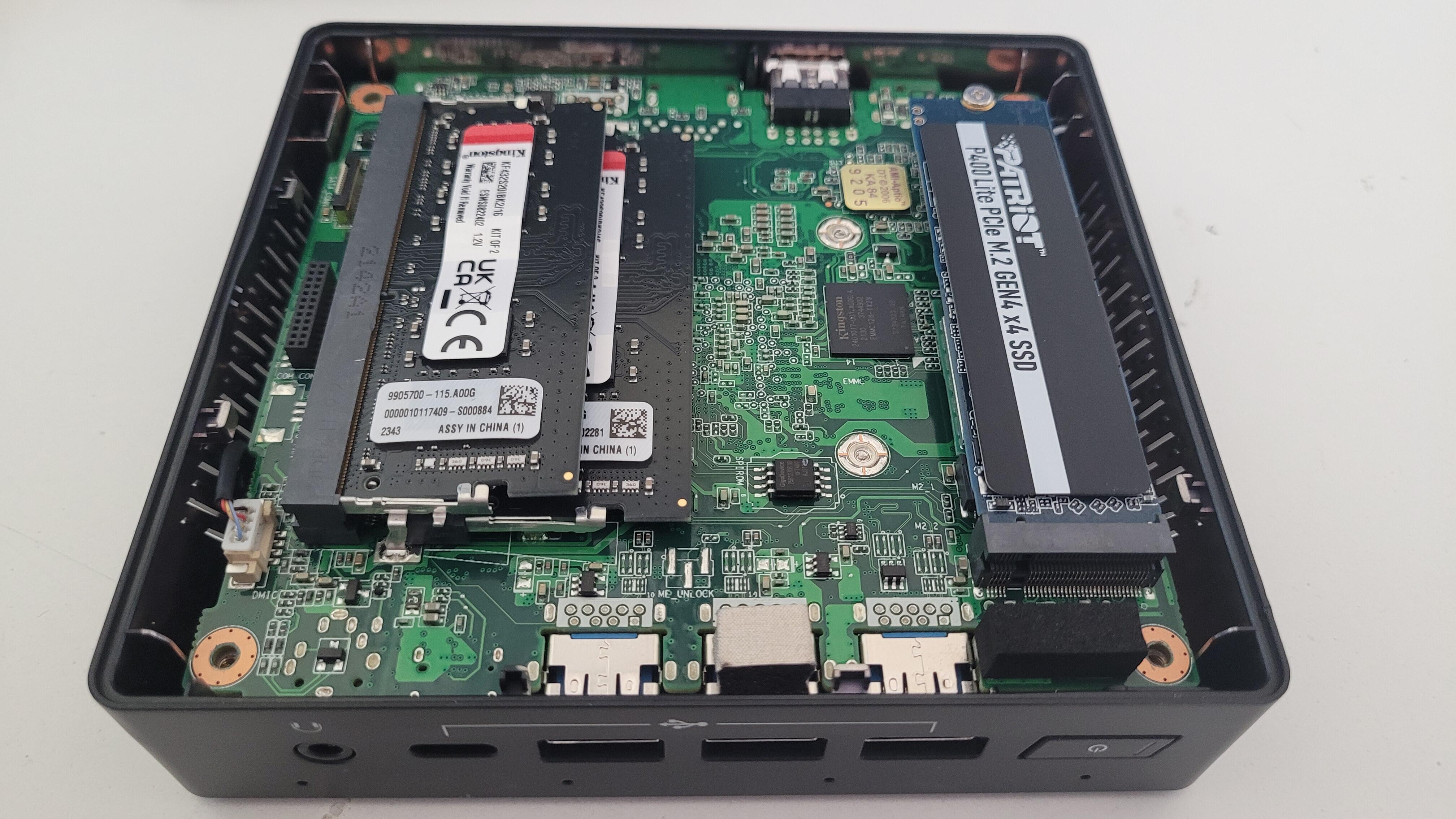
Photos
I took some photos during the “first” assembly process. There have been some change since I replaced the PCIe network cards by USB-3 adapters and finaly used 32Gb So-dimms.








Base infrastructure
Prepare for PXE boot
As described previously, I configured all 3 nodes to boot via Network / PXE by default and fallback to internal storage. The main goal is to be able to “factory reset” any server while rebooting (all “post-install” configuration is then done by Saltstack).
If I want to restart one node from scratch, I just enable pxeboot on my PFsense box, set the corresponding boot file and reboot the device. Once the install has finished, I disable pxeboot and the device fallback to the media on which the fresh install has been done.
In Pfsense, I installed the package “tftpd”. then I configured it via the menu “Services / TFTPD Server”:
- Enable it
- Restrict to ip adresses of vlan with PXE enabled devices
- Set to ipv4 only as I don’t use IPv6 for now
- Open udp port 69 in the corresponding vlan
- Download IPXE and and add files on the TFTP Server (http://boot.ipxe.org/undionly.kpxe and http://boot.ipxe.org/ipxe.efi). In my case, I used scp to copy files on my PFsense box.
- Add an autoxec.ipxe file that will be launched by ipxe
Bellow is the my autoxec.ipxe file:
#!ipxe
dhcp

set webserver tftp://aaa.bbb.ccc.dddd

initrd ${webserver}/pve-8.2/initrd || echo "error loading initrd"
kernel ${webserver}/pve-8.2/linux26 initrd=initrd ramdisk_size=16777216 rw proxmox-start-auto-installer || echo "error loading kernel"

boot
Note that calling “dhcp” in first place seems to be redundant as the Bios / EFI already got an ip address to load ipxe. But In fact, without calling “dhcp”, I had timeout while loading the (quite big) Proxmox initrd file…
Then I configured PFsense’s DHCP service to send required information for PXE boot to work:
- Uncheck ignore bootp queries
- set TFTP Server to the corresponding IP of the router (for each vlan on which tftpd should respond)
- Enable network booting
- Set the boot files : undionly.kpxe for BIOS and ipxe.efi for UEFI
In order to be able to control and customize any node on my network, each one has a specific “autoexec.ipxe” and “initrd” files that I just rename when I need to re-stage them.
I keep the default autoexec.ipxe with the “exit 1” command so by default, my servers boot to the next BIOS option. It is not mandatory but it makes the boot process faster when PXE is not enabled.
Now booting any node from my network is possible and simply controled via my PFSense box.
Proxmox nodes provisioning
PXE image creation
What I wanted was to boot any node from the Proxmox ISO in “auto install” mode as explained on the wiki page https://pve.proxmox.com/wiki/Automated_Installation. This implies to generate a custom ISO image with my own answers file, then to convert the ISO into a PXE bootable file with https://github.com/morph027/pve-iso-2-pxe.
I also needed to add some customizations to both install process and first boot.
What I added to the the install process are:
- Patch Proxmox to allow installing on an emmc disk (for the Liva z3)
- Add a custom network interfaces file to setup the network correctly (vlan, bond, etc.)
- Add a custom rc.local file to further customize after the installation process
During the first boot, I wanted to execute some actions so each node could be ready and fully configured with very few manual actions. This the purpose of the custom rc.local:
- Configure network interfaces with the file injected in the ISO image
- Configure /dev/sda to be fully dedicated to proxmox root (other storages are on nvme)
- Remove enterprise repository and enable the community one
- Remove subscription nag uppon login
- Install saltstack so nodes can be automaticaly configured after the first boot
- Create a zfs pool on the nvme disk
- Enable wake-on-lan
- Create a first LXE container on node-3 to host the salt-master
- Create the Proxmox cluster on node-1
Each node is fully configured at first boot either by rc.local file or by saltstack which runs highstate for any new node.
This leads me to the create two Github projects:
- A public “generic” one that allows to generate PXE image with automated Proxmox install and custom files : https://github.com/jit06/pve-auto-pxe
- A private “specific” one: which contains my own custom files and a small build system to create all needed files in a folder that can be mounted as “/config” for pve-auto-pxe.
Obviously, I cannot share the private repository as it contains some informations I don’t want to share, but basically this is what it does:
- Create a build folder with hostname sub folders in it
- If a hostname’s specific rc.local exists, merge it with the main rc.local
- Generate a finalized rc.local and autoexec.pxe files for all hosts
- Ask for, then inject root password in answer.toml files
- Ask for, and inject saltstack and git passwords for the Liva z3 node
This build script generates a kernel and initrd files that can be copied to the TFTP server on my Pfsense. The initrd file is 1.6Go in size and PFSense does not allow to copy such big file from the web interface. It has to be copied though ssh / scp.
Customized Proxmox images
The Proxmox ISO image customization is here to set up things that are more or less hardware related or needed right after a clean install. Everything else is set and / or tuned with saltstack.
As explained earlier, the initial configuration is done via a custom rc.local script injected in the Proxmox ISO image. All nodes have the same rc.local base plus a specific one.
Below is the common rc.local. It is executed only once as it is replaced by a new one via saltstack as soon as the salt-minion is connected.
Click to expand code
#!/bin/sh -e
#
# rc.local
#
# This script is executed at the end of each multiuser runlevel.
# any non 0 exit will be reported as failure by systemd

# set new interfaces file if any
if [ -f /etc/network/interfaces.install ]; then
    echo "found a network interfaces file to install"
    rm /etc/network/interfaces
    mv /etc/network/interfaces.install /etc/network/interfaces
    systemctl restart networking
fi

# /dev/sda is fully dedicated to pve root
if [ -e /dev/pve/data ]; then
    echo "found /dev/pve/data LVM partition: remove it and extend /dev/pve/root"
    lvresize -l +100%FREE /dev/pve/root
    resize2fs /dev/mapper/pve-root
    sleep 10
fi

# remove enterprise repo and enable the commnunity one's
if [ -f /etc/apt/sources.list.d/pve-enterprise.list ]; then
    echo "Enterprise repository found: disable it and enable commnunity repo"
    rm /etc/apt/sources.list.d/pve-enterprise.list
    rm /etc/apt/sources.list.d/ceph.list
    echo "deb http://download.proxmox.com/debian/pve bookworm pve-no-subscription" >> /etc/apt/sources.list

    echo "Trigger update and full upgrade"
    apt update && apt -y full-upgrade
fi

# remove the subscription NAG uppon login
if [ ! -f /usr/share/javascript/proxmox-widget-toolkit/proxmoxlib.js.bak ]; then
    echo "subscription NAG found, removing it"
    sed -Ezi.bak "s/(Ext.Msg.show\(\{\s+title: gettext\('No valid sub)/void\(\{ \/\/\1/g" /usr/share/javascript/proxmox-widget-toolkit/proxmoxlib.js
    systemctl restart pveproxy.service
fi

# install saltstack Onedir repo
if [ ! -f  /etc/apt/keyrings/salt-archive-keyring.pgp ]; then
    echo "Saltstack keyring not found, install it"
    wget --tries=3 --waitretry=3 --no-dns-cache --retry-on-host-error -O /etc/apt/keyrings/salt-archive-keyring.pgp https://packages.broadcom.com/artifactory/api/security/keypair/SaltProjectKey/public
fi

if [ ! -f /etc/apt/sources.list.d/salt.sources ]; then
    wget --tries=3 --waitretry=3 --no-dns-cache --retry-on-host-error -O /etc/apt/sources.list.d/salt.sources https://github.com/saltstack/salt-install-guide/releases/latest/download/salt.sources;
    apt update && apt -y install salt-minion
    mkdir -p /etc/salt/minion.d
    echo "master: saltmaster.local.lan" >> /etc/salt/minion.d/master.conf
    echo "startup_states: highstate" >> /etc/salt/minion.d/minion.conf
    systemctl enable --now salt-minion
fi

# create zfs volumes on first nvme disk if not exists
if [ $(zpool list | grep zfs-storage | awk '{print $1}') = "zfs-storage" ]; then
    # do nothing
    echo "zfs-storage found"
else
    echo "no zfs-storage pool found, creating it on /dev/nvme0n1"

    # erase partition table
    dd if=/dev/zero of=/dev/nvme0n1 bs=512 count=1

    #create the pool
    zpool create -o autotrim=on -o ashift=12 zfs-storage /dev/nvme0n1

    # disable access time and sync for better performnances
    zfs set atime=off zfs-storage
    zfs set sync=disabled zfs-storage

    # set compression
    zfs set compression=lz4 zfs-storage

    pvesm add zfspool storage -pool zfs-storage
fi

if [ -f /etc/default/grub.d/installer.cfg ]; then
    rm /etc/default/grub.d/installer.cfg
    update-grub
fi

# enable wake on lan on all physical interfaces
nics=$(ip -pretty link show | \grep enp | awk '{print $2}' | cut -d':' -f 1)
if [ -n "$nics" ]; then
    for interface in $nics
    do
        echo "Enable WOL for $interface"
        ethtool -s $interface wol g
    done
fi
As seen in the first lines, a dedicated /etc/network/interfaces.install is moved to replace the original one. This specific file is copied during the customization of the Proxmox ISO image. This file is very important because it set up the whole network. It is pretty similar on both node: a bridge dedicated to VM and LXC, and another bridge dedicated to the replication (corosync, zfs, etc.).
The interfaces file is like the following:
Click to expand code
##########################################################
#
# Physical interfaces : only used though virtual networks
#
##########################################################
auto lo
iface lo inet loopback

# USB 2.5G nic wired to the other node
auto enx00e04c68030c
iface enx00e04c68030c inet manual

# internal 1GB nic bonded with USB 2.5GB
auto enp2s0
iface enp2s0 inet manual

# 2nd USB NIC bonded with internal NIC
auto enx00e04c680b32
iface enx00e04c680b32 inet manual

##########################################################
#
# link aggregations
#
##########################################################
# main bond to host all vlans
auto bond0
    iface bond0 inet manual
    hwaddress xx:xx:xx:xx:xx:xx
    bond-slaves enp2s0 enx00e04c680b32
    bond-miimon 100
    bond-xmit-hash-policy layer2+3
    bond-mode 802.3ad  # LACP

##########################################################
#
# bridges
#
##########################################################
# bridge to host all vlan + management (untagged vlan 40)
auto vmbr0
iface vmbr0 inet dhcp
    bridge-ports bond0
    bridge-stp off
    bridge-fd 0
    bridge-vlan-aware yes
    bridge-vids 2-4094    # vlan are handled on VM network card
    bridge_ageing 0

# Network for replication on dedicated 2.5G NIC
auto vmbr1
    iface vmbr1 inet static
    address 10.0.0.2/24
    bridge-ports enx00e04c680b32
    bridge-stp off
    bridge-fd 0
The node-1 has a special treatment because it has NL drives for NAS storage. At this stage, the script assumes that NAS drives are already formated (mkfs.ext4 -F -b 4096 /dev/sdx1) because in case of restaging, I dont want to risk any loss of data.
This first rc.local also creates the corosync cluster:
Click to expand code
#### create cluster if it does not exists
if [ ! -f /etc/pve/corosync.conf ]; then
    pvecm create cluster --link0 address=aaa.bbb.ccc.ddd
    echo "migration: secure,network=10.0.0.0/24" >> /etc/pve/datacenter.cfg
fi

#### add qdevice for corosync quorum
if [ ! -f /sbin/corosync-qdevice ]; then
    apt -y install corosync-qdevice
fi

#### setup storages
if [ -z "$(grep 'dir: vz' /etc/pve/storage.cfg)" ]; then
    # dedicated directory on zfs for iso and lxc templates
    zfs create zfs-storage/vz
    pvesm add dir vz --path /zfs-storage/vz --content 'vztmpl,iso,snippets'

    # no content allowed on system disk
    pvesm set local --content ''

    # NL drives for nas and backup
    mkdir -p /nas-storage /nas-mirror
    echo "LABEL=NAS-STORAGE     /nas-storage    ext4    nofail,nodev,nosuid,relatime,noexec,async           0 2" >> /etc/fstab
    echo "LABEL=NAS-MIRROR      /nas-mirror     ext4    nofail,noauto,nodev,nosuid,relatime,noexec,async    0 2" >> /etc/fstab
    systemctl daemon-reload
    mount /nas-storage
    pvesm add dir backup --path /nas-storage/backup --content 'backup' --nodes 'node-1'
fi
Finally, the node-3 has a special treatment too on its rc.local: as this is the host for saltstack master, a dedicated LXC is created to be able to initialize everything else when all nodes are ready, including PGP initilization needed to encrypt and decrypt secrets that are stored on my private saltstack git repository (more details on this subject later).
Click to expand code
#### install corosync-qnetd package for external vote support on the cluster
if [ ! -f /usr/bin/corosync-qnetd ]; then
    apt -y install corosync-qnetd
fi

if [ -z "$(grep 'dir: vz' /etc/pve/storage.cfg)" ]; then
    # only template and iso allowed on system disk
    pvesm set local --content 'vztmpl,iso'
    # zfs-storage host vm and lxc contents
    pvesm set storage --content 'images,rootdir'
fi

#### create saltstack lxc if not exists
if [ "$(pct list | grep saltmaster | awk '{print $1}')" -eq 100 ]; then
    echo "found saltmaster lxc"
else
    pveam update

    # download the needed template
    TEMPLATE=$(pveam available --section system | grep debian-12 | awk '{print $2}')
    pveam download local $TEMPLATE

    # create the container
    pct create 100 /var/lib/vz/template/cache/$TEMPLATE \
    --cores 2 \
    --memory 2048 \
    --storage storage \
    --description "saltstack master for home cloud" \
    --hostname "saltmaster" \
    --onboot 1 \
    --ostype debian \
    --password "SALTMASTER_ROOT_PWD" \
    --swap 0 \
    --features nesting=1 \
    --net0 name=eth0,bridge=vmbr0,ip=dhcp,tag=xx

    sleep 2
    pct start 100

    # prepare and upgrade OS
    pct exec 100 -- bash -c "apt update && apt -y upgrade && apt -y install git gpg sudo"

    # install saltstack onedir repo
    pct exec 100 -- bash -c '\
    wget --tries=3 --waitretry=3 --no-dns-cache --retry-on-host-error -O /etc/apt/keyrings/salt-archive-keyring-2023.gpg https://repo.saltproject.io/salt/py3/debian/12/amd64/SALT-PROJECT-GPG-PUBKEY-2023.gpg
    echo "deb [signed-by=/etc/apt/keyrings/salt-archive-keyring-2023.gpg arch=amd64] https://repo.saltproject.io/salt/py3/debian/12/amd64/latest bookworm main" | tee /etc/apt/sources.list.d/salt.list'

    # install needed packages
    pct exec 100 -- bash -c "apt update && apt -y install salt-master salt-minion"
    pct exec 100 -- bash -c "salt-pip install pyinotify croniter IPy"

    # clone the saltstack IAC git repo
    pct exec 100 -- bash -c "\
    rm -Rf /srv/*
    git clone https://XXX:SALTMASTER_GIT_PWD/XXX/saltstack /srv"

    # configure saltmaster
    pct exec 100 -- bash -c '\
    mkdir -p /etc/salt/master.d
    echo "cli_summary: True" >> /etc/salt/master.d/saltmaster.conf
    echo "auto_accept: True" >> /etc/salt/master.d/saltmaster.conf
    echo "state_output: changes" >> /etc/salt/master.d/saltmaster.conf
    systemctl enable --now salt-master'

    sleep 5

    # configure saltminion
    pct exec 100 -- bash -c '\
    mkdir -p /etc/salt/minion.d
    echo "master: saltmaster.local.lan" >> /etc/salt/minion.d/minion.conf
    echo "startup_states: highstate" >> /etc/salt/minion.d/minion.conf
    systemctl enable salt-minion'

     # configure gpg
    pct exec 100 -- bash -c 'echo "SALTMASTER_GPG_PUB" > /tmp/pubkey.asc'
    pct exec 100 -- bash -c 'echo "SALTMASTER_GPG_PRIV" > /tmp/privkey.secret.b64'
    pct exec 100 -- bash -c '\
        mkdir -p /etc/salt/gpgkeys
        chmod 0700 /etc/salt/gpgkeys
        echo 'homedir /etc/salt/gpgkeys' >> /root/.gnupg
        base64 -d /tmp/privkey.secret.b64 > /tmp/privkey.secret
        gpg --homedir /etc/salt/gpgkeys --import /tmp/privkey.secret
        gpg --homedir /etc/salt/gpgkeys --import /tmp/pubkey.asc
        echo 'gpg_keydir: /etc/salt/gpgkeys' >/etc/salt/master.d/gpg-pillar.conf
        chown -R salt:salt /etc/gpgkeys
        rm /tmp/privkey.*
        rm /tmp/pubkey.*'

    pct reboot 100

    # reload salt-minion to register correctly
    systemctl restart salt-minion
fi
Words in upper case like “SALTMASTER_ROOT_PWD” are injected by my custom build script during the ISO creation. As all rc.local files got deleted after the first connection to the saltmaster, I do not consider that as a big security concern.
The git repository used is a private one, which serves for GitOps via saltstack (more on that later).
The only remaining manual operations are listed below. After these actions, everything is set up and ready (including a fully functionnal k3s cluster with apps, again: more on that later):
-
reboot all nodes to unsure that all configurations are taken into account
-
adding node-2 to the cluster : it needs root password thus I can’t provide it in rc.local
pvecm add node-1.local.lan --link0 address=aaa.bbb.ccc.ddd -
add the qdevice on node-3 :
pvecm qdevice setup aaa.bbb.ccc.ddd -
apply saltstack map states (iac_backend.host-map.sls) : can’t do it before the cluster is created
-
set saltmaster not to auto accept minions (auto_accept: false)
Saltstack + Git as IAC frontend
Concept
As seen previously, the salt master is an LXC container that is automatically configured during the very first boot of node-3 (the Liva Z3). This makes it fully reproducible, eliminating the need to rely on backups. The goal is to quickly set up a salt master from scratch and use it to configure everything else, including the salt master itself.
Basically, the concept is based on the following principles:
- A private Git repository contains all state and pillar definitions
- The repository is cloned regularly on the salt master LXC.
- Any file change in the cloned repository triggers a highstate application on all registered minions.
- Any new minion automatically applies a highstate upon registration.
- A highstate is periodically applied to all minions.
This way, SaltStack acts as an Infrastructure as Code (IaC) frontend via Git: any push triggers changes in the infrastructure, removing the need for manual shell commands or direct connections to any server—whether it is an LXC, a virtual machine, or a Proxmox node.
Additionally, any new server is automatically configured, allowing me to rebuild parts or even the entire infrastructure with a simple salt '*' state.apply command.
Implementation
To implement the GitOps approach, one possible solution could have been to use GitFS to host SaltStack’s files. However, since I do not plan to make changes directly on the salt master (which, in my opinion, is an anti-pattern), I adopted a KISS approach: : a simple scheduled git pull task combined with an inotify-based state to apply any modifications.
To achieve this, the salt master has a scheduled task that pulls the repository every 2 minutes and a reactor configuration together with an inotify beacon.
refresh_saltstack_repo:
    schedule.present:
        - function: state.apply
        - job_args:
            - iac_frontend.repository
        - cron: '*/2 * * * *'
        - enabled: True

salt-master:
    file.managed:
        - names:
            - /etc/salt/master.d/reactor.conf:
                - source: salt://iac_frontend/files/reactor.conf
    service.running:
        - watch:
            - file: /etc/salt/master.d/reactor.conf

salt_states_changed:
    beacon.present:
        - save: True
        - enable: True
        - interval: 2
        - beacon_module: inotify
        - disable_during_state_run: False
        - files:
            /srv:
                mask:
                    - create
                    - moved_to
                recurse: True
                auto_add: True
                exclude:
                    - /srv/salt/reactor
The repository pull state is like the following (url and credentials are stored on pillar values, more on that later):
saltstack_repo:
    git.latest:
        - name: https://path_to_git/repo
        - target: /srv
        - https_user: user
        - https_pass: password
The “reactor.conf” file defines a state to be executed on each detected change:
- 'salt/beacon/*/salt_states_changed/*':
        - salt://reactor/handle_changed_states.sls
And here is the “handle_changed_states.sls” content which simply applies hightstate on all registered minions
apply_highstate:
  salt.state:
        - tgt: '*'
        - highstate: True
As explained earlier, with such a simple mecanism, any push to the git repository triggers any infrastructure and configuration changes, no need to login into the saltmaster nor any server. Of course any error will also be deployed very fast : “with great power come great responsibilities” :)
Secured secrets
Even though my SaltStack repository is private, it is still hosted on external cloud servers. Since the entire architecture relies on secrets such as passwords or private keys, I needed to set up a secure way to store this kind of information.
My setup follows SaltStack’s approach, which consists of managing secrets with pillar values for the storage and GnuPG for encryption
As previously mentioned, the custom rc.local file of node-3, executed during the first boot, initializes the GnuPG environment and injects the key pair (which I store in a private local location).
Thus, the SaltMaster LXC contains everything needed to encrypt a new secret with a command like:
echo -n 'value to encrypt' | gpg --homedir /etc/salt/gpgkeys --trust-model always -ear <MY KEY-ID>
The output is an encrypted string that can be used as saltstack pillar:
#!yaml|gpg

standard_value: not encrypted
encrypted_vlue: |
  -----BEGIN PGP MESSAGE-----

  PLb8RzQsA+XVp8SqaB/h2IsbSlwxC5auXxkJtQiZfeSJPVINAXIlT8F6KDRO5Aqe
  HaV2577PsEVRNeY9mMxPe0KVpuV3mPYL+2lpemEtwpJYDP1kByKMDiXt66sbyCNp
  v9lGMZI9ZnBsdGgLisZwDdaS0Vs+4MniIbw==
  -----END PGP MESSAGE-----
Saltstack repository architecture
I tried to follow the best pratices : pillar contains variables and customized values while states are mostly generics and depend on pillar’s values.
Bellow is a commented overview of the saltstack directory structure. Each element is detailled later.
| level 1 | level 2 | comments |
|---|---|---|
| pillar | ||
| k3s | settings to deploy the k3s cluster | |
| maps | define all virtual machines and LXC specifications for all nodes | |
| services | settings for specific services like reverse proxy (nginx) | |
| users | defines users and groups that should exists or be deleted | |
| zabbix | settings dedicated to zabbix states | |
| git.sls | settings for my saltstack git repository | |
| iac_backend.sls | define sysctl values and custom scripts for all proxmox nodes | |
| kubeapps.sls | define applications that must be deployed in the k3s cluster | |
| mail.sls | settings for e-mail account and aliases for servers to be able to send e-mails | |
| top.sls | ||
| salt | ||
| iac_backend | dedicated to proxmox backend deployments | |
| iac_frontend | dedicated to saltstack and gitops | |
| kubeapps | states that deploy applications in k3s | |
| reactor | deploy reactor configuration, essentialy for the gitops approach | |
| services | deploy services as defined in states | |
| sysadmin | states dedicated to apply a standard configuration all servers, being LXC or VM | |
| users | ensure that users and groups exist or are absents | |
| top.sls |
Proxmox nodes as IAC_backend
Proxmox customization
I did some adjustements on Proxmox nodes either to “optimize” things for my modest hardware, to reduce power consumption or simply to install my custom scripts
The table below show the optimization related settings.
| What | How |
|---|---|
| Allow swap usage only when less than 1% free RAM. This preserve my SSD | set vm.swappiness to 1 |
| disable ipv6 as I don’t use it | set net.ipv6.conf.all.disable_ipv6 to 1 |
| Ensure there is at least 256Mb free in order to always be able to execute sysadmin tools (ssh, screen, netstate, etc.) | set vm.min_free_kbytes to 262144 |
| Better I/O multitasking performances by limitting the size of writebacks (ram cache to disk) | Tset vm.dirty_ratio to 20 |
These settings are applied through states and pillar values.
Pillar are defined like the follwing:
Click to expand code
iac_backend:
# custom scripts to install to /usr/loc/bin
  framework:
    - set_lxc.sh
    - set_vm.sh
    - set_templates.sh
    - set_common.sh
    - set_zfspv.sh

# sysctl settings to set
  sysctl:
    vm.swappiness: 1
    net.ipv6.conf.all.disable_ipv6: 1
    vm.min_free_kbytes: 262144
    vm.dirty_ratio: 20
And states applied to Promox nodes (more on udev rules in the next chapter):
Click to expand code
##############################################################
# Deploy framework to handle IAC on Proxmox:
# - define cluster hosts in /etc/hosts
# - install requiered packages
# - set a new rc.local to remove the one used during first boot
# - install all custom script used to manage operations
# - tune some parameters for better performances
# - deploy a set of udevrules for better power management
##############################################################

proxmox-cluster-hosts:
  file.managed:
    - name: /etc/hosts
    - source: salt://iac_backend/files/hosts
    - user: root
    - group: root
    - mode: 644

proxmox_packages:
  pkg.installed:
    - pkgs:
      - libguestfs-tools

proxmox-rc-local:
  file.managed:
    - name: /etc/rc.local
    - source: salt://iac_backend/files/rc.local
    - user: root
    - group: root
    - mode: 750

{% if salt['pillar.get']('iac_backend:framework', none) is not none %}
proxmox_scripts:
  file.managed:
    - names: {% for file in pillar['iac_backend']['framework'] %}
        - /usr/local/bin/{{ file }}:
            - source: salt://iac_backend/files/{{ file }}
            - mode: 750
             {%- endfor -%}
{% endif %}

{% if salt['pillar.get']('iac_backend:sysctl', none) is not none %}
proxmox_sysctl_settings:
  sysctl.present:
    - names: {% for setting in pillar['iac_backend']['sysctl'] %}
      - {{ setting }}:
        - value: {{ pillar['iac_backend']['sysctl'][setting] }}
             {%- endfor -%}
{% endif %}

proxmox_udev:
  cmd.run:
    - name: udevadm control --reload-rules
    - onchanges:
      - file: proxmox_udev_rules

proxmox_udev_rules:
  file.managed:
    - names:
      - /etc/udev/rules.d/99-powermgmt.rules:
        - source: salt://iac_backend/files/99-powermgmt.rules
        - mode: 640
Power consumption
One major advantage of my old ARM-based home lab solution was its low power consumption: it was around 60W, including my 24-port switch.
Switching to x86 required some BIOS tuning (see the beginning of this article), even with low-power CPUs. Unfortunately, I wasn’t able to achieve a huge reduction in power consumption. The initial power draw of the N100 nodes was about 19 watts. After applying BIOS tweaks and Linux adjustments, I managed to reduce it to 17.5W.
Here are my “low-power” udev rules, installed in /etc/udev/rules.d/99-powermgmt.rules:
ACTION=="add", SUBSYSTEM=="pci", ATTR{power/control}="auto"
ACTION=="add", SUBSYSTEM=="ahci", ATTR{power/control}="auto"
ACTION=="add", SUBSYSTEM=="scsi_host", KERNEL=="host*", ATTR{link_power_management_policy}="min_power"
ACTION=="add", SUBSYSTEM=="usb", ATTR{power/autosuspend_delay_ms}="1000"
ACTION=="add", SUBSYSTEM=="usb", ATTR{power/control}="auto"
ACTION=="add", SUBSYSTEM=="scsi", ATTR{power/control}="auto"
ACTION=="add", SUBSYSTEM=="acpi", ATTR{power/control}="auto"
ACTION=="add", SUBSYSTEM=="block", ATTR{power/control}="auto"
ACTION=="add", SUBSYSTEM=="workqueue", ATTR{power/control}="auto"
ACTION=="add", SUBSYSTEM=="i2c", ATTR{power/control}="auto"
With everything running, including the NL drives, ethernet switch, pfSense box, and rack cooling fans, I measured between 68W and 75W total. I found this reasonable: it’s a 25% increase in power consumption compared to my old ARM cluster, but with more than 25% performance gains. In the end, this translates to about 150 euros per year, which is much cheaper than a similar cloud service.
Desired state configuration
As mentioned earlier, I use Proxmox as my IAC backend. To have a system that allows defining LXC containers and virtual machines in a desired state configuration style, I had to write some scripts.
I should have used salt-cloud, but at the time of writing, the current Proxmox extension isn’t very useful: it lacks reliable error reporting and is not yet officially integrated.
Terraform or OpenTofu could have been good candidates, but they are too complex for a simple infrastructure like mine.
My approach is based on VMs, templates, and LXC definitions through pillar values, with deployment managed via states and custom scripts to handle both creation and modification.
I wrote four scripts for VM and LXC creation/update. Their outputs follow SaltStack’s stateful script requirements.
set_common.sh: Common tools and definitions for all scripts.
Click to expand code
#!/bin/bash

### COMMON VALUES ###########################
DEBIAN12_CMD_INSTALL_SALTMINION=('\
        wget --tries=3 --waitretry=3 --no-dns-cache --retry-on-host-error -O /etc/apt/keyrings/salt-archive-keyring.pgp https://packages.broadcom.com/artifactory/api/security/keypair/SaltProjectKey/public; \
        wget --tries=3 --waitretry=3 --no-dns-cache --retry-on-host-error -O /etc/apt/sources.list.d/salt.sources https://github.com/saltstack/salt-install-guide/releases/latest/download/salt.sources; \
        apt -qq update > /dev/null'
)

DEBIAN12_CMD_CONFIG_SALTMINION=('\
        mkdir -p /etc/salt/minion.d; \
        echo "master: saltmaster.local.lan" >> /etc/salt/minion.d/minion.conf; \
        systemctl enable salt-minion'
)

### GLOBAL VARIABLES ###########################
CHANGED="no"
COMMENT=""
REPORT=""
SPECIAL_ARGS=""
MANDATORY=""
declare -A arguments
declare -A specials

### FUNCTIONS ##################################

# print a message that can be interpreted by saltstack cmd.script state
# $1=exit code
ExitMessage()
{
    echo
    echo $REPORT
    echo "changed=$CHANGED comment='$COMMENT'"
    exit $1
}

# populate the arguments array waiting for key=value pairs
# $1 are key exceptions that are mapped in $specials array
# $2...$x all argumnts to parse
ParseParameters()
{
    # read parameters and store them in a hashmap
    for arg in "$@"
    do
        # separate argumente name and value (expecting name=value)
        name=${arg%%=*}
        value=${arg#*=}

        # extract special parameter for future usage
        if [[ $SPECIAL_ARGS == *"$name"*  ]]; then
            specials[$name]=$value
        else
            # drop description as it causes problem to pass it to cli commands (quotes)
            if [[ $name != 'description' ]]; then
                arguments[$name]=$value
            fi
        fi
    done
}

# check that mandatory parameters are set
CheckMandatory()
{
    for key in $MANDATORY
    do
        if [[ -z ${arguments[$key]}  ]] && [[ -z ${specials[$key]} ]] ; then
            COMMENT="'$key' parameter is mandatory"
            ExitMessage 2
        fi
    done

}

# parse a config output from proxmox cli command (qm config or pct config)
# Call ConfigValue() function (defined in host script) for each parsed value.
#
# $1 = config string
Parseconfig()
{
    OIFS="$IFS"
    IFS=$'\n'

    for setting in $1
    do
        name=${setting%%:*}
        value=${setting#*': '}

        ConfigValue "$name" "$value"
    done
    IFS="$OIFS"
}
set_lxc.sh: handle LXC creation and update
Click to expand code
#!/bin/bash

source /usr/local/bin/set_common.sh

### GLOBAL VARIABLES ###########################
CREATE=""
OSVER=""
SPECIAL_ARGS="osver"
MANDATORY="id"

### FUNCTIONS ##################################
Help()
{
   # Display Help
   echo
   echo "Unsure a proxmox container exists as defined."
   echo "Either create it, modify it or do nothing"
   echo
   echo "Syntax: $0 parameter1=value1 [paramter2=value2 [...] ]"
   echo "Parameters and values are passed directly to 'pct'commands."
   echo
   echo There is one special parameter for creation:
   echo "  osver: defines the version of 'ostype'. E.g: 12, base_20240911"
   echo
   echo IMPORTANTS NOTES:
   echo   - description parameter is always dropped
   echo   - rootfs parameter is ignored if container esists
   echo
}

# compare given value and set new config if changed
# $1 = name
# $2 = value
ConfigValue()
{
    # call pct set if anything changed, but for rootfs setting
    if [[ ! -z ${arguments[$1]} ]] && [[ ${arguments[$1]} != $2 ]] && [[ $1 != "rootfs" ]] ; then
        pct set ${arguments['id']} --$1 "${arguments[$1]}"
        CHANGED="yes"
        REPORT="$REPORT $1='${arguments[$1]}'"
    fi

    if [[ $CHANGED == "yes" ]]; then
        COMMENT="Container ${arguments[id]} updated"
    else
        COMMENT="Container ${arguments[id]} already configured"
    fi
}

### SCRIPT LOGIC ################################

# Display help if needed
if [[ ($# -lt 1) || $1 == "help" ]] ; then
    Help
    exit 2
fi

ParseParameters "$@"
CheckMandatory

# check if container exists
if [[ "$(pct list | grep ${arguments['id']} | awk '{print $1}')" -eq ${arguments['id']} ]]; then
    Parseconfig "$(pct config ${arguments['id']})"

# when container does not exists we create it
else
    # to create a container, we need osver (e.g. 12) and ostype (e.g. debian) to find the required template (e.g. debian-12)
    if [[ -z ${specials['osver']} ]] || [[ -z ${arguments['ostype']} ]] ; then
        COMMENT="osver and ostype parameters are mandatory for non existing container"
        ExitMessage 2
    fi

    # build 'pct create' arguments as well as saltstack report for cmd.script state
    for param in ${!arguments[@]}
    do
        if [[ $param != 'id' ]]; then
            CREATE="$CREATE --$param ${arguments[$param]}"
            REPORT="$REPORT $param='${arguments[$param]}'"
        fi
    done

    COMMENT="Container ${arguments['id']} created with"

    # get template filename or download it if not found
    TEMPLATE=$(pveam available --section system | grep "${arguments['ostype']}-${specials['osver']}" | awk '{print $2}')

    TEMPLATE_PATH="/var/lib/vz/template/cache"
    TEMPLATE_STORAGE_NAME="local"
    # define wether to use default local storage of zfs if available
    if [[ -d "/zfs-storage/vz" ]]; then
        TEMPLATE_PATH="/zfs-storage/vz/template/cache"
        TEMPLATE_STORAGE_NAME="vz"
    fi

    if [[ ! -f "$TEMPLATE_PATH/$TEMPLATE" ]]; then
        pveam download $TEMPLATE_STORAGE_NAME $TEMPLATE > /dev/null
        COMMENT="$COMMENT new template: $TEMPLATE"
    else
        COMMENT="$COMMENT existing template"
    fi

    # create container
    pct create ${arguments['id']} $TEMPLATE_PATH/$TEMPLATE $CREATE > /dev/null

    # if container has been created, install salt-minion (depending on OS)
    if [[ $? -eq 0 ]]; then
        CHANGED="yes"

        if [[ "${arguments['ostype']}-${specials['osver']}" == "debian-12" ]]; then

            # set salt-minion requirements
            pct exec ${arguments['id']} -- bash -c "${DEBIAN12_CMD_INSTALL_SALTMINION[@]}"
            # upgrade and install needed packages
            pct exec ${arguments['id']} -- bash -c "apt -yqq upgrade > /dev/null && apt -yqq install salt-minion > /dev/null"
            # configure saltminion
            pct exec ${arguments['id']} -- bash -c "${DEBIAN12_CMD_CONFIG_SALTMINION[@]}"
            # reboot container to make it ready
            pct reboot ${arguments['id']}

            COMMENT="$COMMENT. Salt-minion installed"
        fi
    else
        exit 1
    fi

fi

# print saltstack readble message then exit with success
ExitMessage 0
set_templates.sh: handle Proxmox VM templates
Click to expand code
#!/bin/bash

source /usr/local/bin/set_common.sh

### GLOBAL VARIABLES ###########################
MANDATORY="id name image"

### FUNCTIONS ##################################
Help()
{
   # Display Help
   echo
   echo "Unsure a VM Template is present."
   echo "Either create it or do nothing"
   echo
   echo "Syntax: $0 id=<template id> name=<template name> image=<http link to cloudinit image> [ param=value ]"
   echo "Where param=value can be any "qm set" / "wm create" attributes"
   echo
   echo "NOTE: Created template will have guest-agent and salt-minion installed"
   echo
}

### SCRIPT LOGIC ################################

# Display help if needed
if [[ ($# -lt 3) || $1 == "help" ]] ; then
    Help
    exit 2
fi

ParseParameters "$@"
CheckMandatory

cd /root

# check if template exists
if [[ "$(qm list | grep ${arguments['id']} | awk '{print $1}')" -eq ${arguments['id']} ]]; then
    COMMENT="Image with ID ${arguments['id']} already exists"
    ExitMessage 0
fi

# download image
wget --tries=3 --waitretry=3 --no-dns-cache --retry-on-host-error -nv -c -O "temp.img" ${arguments['image']}
if [[ ! $? -eq 0 ]]; then
    COMMENT="Unable to download image ${arguments['image']}"
    ExitMessage 1
else
    COMMENT="New template created with ID ${arguments['id']} (${arguments['name']})"
fi

# install saltstack on supported images
if [[ ${arguments['image']} == *"debian-12"* ]]; then
    virt-customize -a temp.img --run-command "${DEBIAN12_CMD_INSTALL_SALTMINION[@]}"

    virt-customize -a temp.img --install salt-minion
    if [[ ! $? -eq 0 ]]; then
        COMMENT="Unable to install salt-minion on debian-12 image"
        ExitMessage 1
    fi

    virt-customize -a temp.img --run-command "salt-pip install croniter"
    virt-customize -a temp.img --run-command "${DEBIAN12_CMD_CONFIG_SALTMINION[@]}"

    COMMENT="$COMMENT. Salt-minion installed"
fi

# install guest agent
virt-customize -a temp.img --install qemu-guest-agent
virt-customize -a temp.img --run-command 'systemctl enable qemu-guest-agent'
if [[ ! $? -eq 0 ]]; then
    COMMENT="Unable to install qemu-guest-agent"
    ExitMessage 1
fi

# generate the template
qm create ${arguments['id']} --memory 2048 --core 2 --name ${arguments['name']} --net0 virtio,bridge=vmbr0
qm importdisk ${arguments['id']} temp.img storage > /dev/null
qm set ${arguments['id']}   --scsihw virtio-scsi-pci \
                            --scsi0 storage:vm-${arguments['id']}-disk-0 \
                            --ide2 storage:cloudinit \
                            --boot c --bootdisk scsi0 \
                            --serial0 socket --vga serial0 \
                            --agent enabled=1

qm template ${arguments['id']}
rm /root/temp.img

CHANGED="yes"
ExitMessage 0
set_vm.sh: handle virtual machines creation and update
Click to expand code
#!/bin/bash

source /usr/local/bin/set_common.sh

### GLOBAL VARIABLES ###########################
SPECIAL_ARGS="sshkey id name template start"
MANDATORY="id name template"

### FUNCTIONS ##################################
Help()
{
   # Display Help
   echo
   echo "Unsure a proxmox VM exists as defined."
   echo "Either create it, modify it or do nothing"
   echo
   echo "Syntax: $0 id=<id> name=<name> template=<id> [start=<0 | 1>] parameter1=value1 [paramter2=value2 [...] ]"
   echo "Parameters and values are passed directly to 'qm' commands."
   echo
   echo "IMPORTANTS NOTES:"
   echo "  - description parameter is always dropped"
   echo "  - sshkey is ignored and always defaulted to ~/.ssh/id_rsa.pub"
   echo
}

# compare given value and set new config if changed
# $1 = name
# $2 = value
ConfigValue()
{
    # call pct set if anything changed, but for rootfs setting
    if [[ ! -z ${arguments[$1]} ]] && [[ ${arguments[$1]} != $2 ]] ; then
        # special handling for scsi0: only size is changeable
        if [[ $1 == "scsi0" ]]; then
            disksize=$(echo "${arguments[$1]}" | \grep -oP '(?<=size\=).*(?=G)')
            qm resize ${specials['id']} scsi0 "${disksize}G"
        else
            qm set ${specials['id']} --$1 "${arguments[$1]}"
        fi
        CHANGED="yes"
        REPORT="$REPORT $1='${arguments[$1]}'"
    fi

    if [[ $CHANGED == "yes" ]]; then
        COMMENT="VM ${specials[id]} updated"
    else
        COMMENT="VM ${specials[id]} already configured"
    fi
}

### SCRIPT LOGIC ################################

# Display help if needed
if [[ ($# -lt 3) || $1 == "help" ]] ; then
    Help
    exit 2
fi

ParseParameters "$@"
CheckMandatory

# check if vm exists
if [[ "$(qm list | grep ${specials['id']} | awk '{print $1}')" -eq ${specials['id']} ]]; then
    Parseconfig "$(qm config ${specials['id']})"
else
    # clone template
    qm clone ${specials['template']} ${specials['id']} --name ${specials['name']}
    if [[ ! $? -eq 0 ]]; then
        COMMENT="Error cloning template"
        ExitMessage 1
    fi
    CHANGED="yes"

    # set ssh key
    qm set ${specials['id']} --sshkey ~/.ssh/id_rsa.pub

    # apply all setings from argumemts
    for param in ${!arguments[@]}
    do
        if [[ $param == "scsi0" ]]; then
            disksize=$(echo "${arguments[$param]}" | \grep -oP '(?<=size\=).*(?=G)')
            qm resize ${specials['id']} scsi0 "${disksize}G"
        else
            qm set ${specials['id']} --$param ${arguments[$param]}
        fi
        REPORT="$REPORT $param='${arguments[$param]}'"
    done

    if [[ ! -z ${specials['start']} ]] && [[ ${specials['start']} -eq 1 ]] ; then
        qm start ${specials['id']}
        if [[ $? -eq 0 ]]; then
            COMMENT="$COMMENT. VM started"
        else
            COMMENT="$COMMENT. Error trying to start the VM"
        fi
    fi
fi

# print saltstack readble message then exit with success
ExitMessage 0
Below is how I defined templates, LXC and VM as pillar values to create and/or update them:
Click to expand code
templates:
  tpl-debian-12: >
    id=9200
    name=debian-12
    image=https://cloud.debian.org/images/cloud/bookworm/latest/debian-12-generic-amd64.qcow2

map:
  lxc-goldorak:
    password: |
      -----BEGIN PGP MESSAGE-----

      [...]
      -----END PGP MESSAGE-----
    settings: >
      id=300
      hostname=goldorak
      cores=2
      memory=1024
      rootfs=storage:6
      net0=name=eth0,bridge=vmbr0,ip=dhcp,tag=2,type=veth
      ostype=debian
      osver=12
      onboot=1
      swap=0
      features=nesting=1
      start=1

  vm-k3s-master-1:
    password: |
      -----BEGIN PGP MESSAGE-----

      [...]
      -----END PGP MESSAGE-----
    settings: >
      id=1200
      name=k3s-master-1
      template=9200
      cores=4
      scsi0=storage:base-9200-disk-0/vm-1200-disk-0,size=20G
      memory=12288
      net0=model=virtio,bridge=vmbr0,tag=3
      ipconfig0=ip=dhcp
      searchdomain=local.lan
      onboot=1
      start=1
Now, the part of the states that handle these pillar values:
Click to expand code
# handle VM templates
{% if pillar.get('templates', none) is not none %}
{% for id in pillar['templates'] %}
{{ id }}:
    cmd.script:
        - name: /usr/local/bin/set_templates.sh
        - stateful: True
        - require:
            - file: proxmox_scripts
            - pkg: proxmox_packages
        - args: {{ pillar['templates'][id] }}
{% endfor %}
{% endif %}

# handle VM and LXC creations and updates
{% if pillar.get('map', none) is not none %}
{% for id in pillar['map'] %}
{% if id.startswith('lxc')      %}
{%   set password='password='   %}
{%   set name='set_lxc.sh'      %}
{% elif id.startswith('vm')     %}
{%   set password='cipassword=' %}
{%   set name='set_vm.sh'       %}
{% endif %}
{% set password=password~pillar['map'][id]['password'] %}
{{ id }}:
    cmd.script:
        - name: /usr/local/bin/{{ name }}
        - stateful: True
        - require:
            - file: proxmox_scripts
            - pkg: proxmox_packages
        - args: >
            {{ password }}
            {{ pillar['map'][id]['settings'] }}
{% endfor %}
{% endif %}
User management
My user management needs are pretty basic: system accounts and Samba shares. A simpler alternative to LDAP for my home lab is using states and minion values to handle all operations (create, modify, delete) and synchronize them across all hosts.
Example of user definitions in the pillar:
Click to expand code
#!yaml|gpg

# if defined AND set to true, this setting is used to trigger
# samba password handling. Else, only system password are set
pdbedit: True

revokedusers:
  - debian

users:
  test:
    fullname: full test
    uid: 1000
    shell: /bin/bash
    ssh-keys:
      - ssh-ed25519 [...] test@my_computer
    groups:
      - adm
      - plugdev
      - sudo
      - staff
      - my_group
    password: |
      -----BEGIN PGP MESSAGE-----

      [...]
      -----END PGP MESSAGE-----

groups:
  my_group:
    gid: 1003
States to handle users on all nodes:
Click to expand code
##############################################################
# Handle users on all managed hosts
# - Remove users present in 'revokedusers' pillar (including ssh key)
# - Add groups present in 'groups' pillar
# - Add users present in 'users' pillar (including ssh key)
# - Handle samba passwords if needed ('pdbedit' pillar)
##############################################################

# delete users and groups that have been revoked
# unsure user is no more referenced
{% if pillar.get('revokedusers', none) is not none %}
{% for user in pillar['revokedusers'] %}
{{user}}:
  user.absent: []
  group.absent: []

# unsure user ssh key is no more used by root
{% if salt['pillar.get']('revokedusers:ssh-keys', none) is not none %}
{{user}}_root_key:
  ssh_auth.absent:
    - user: root
    - names:
      {% for key in pillar['revokedusers']['ssh-keys'] %}
      - {{ key }}
      {% endfor %}

# unsure user ssh key is no more used for this user
{{user}}_key:
  ssh_auth.absent:
    - user: {{user}}
    - names:
      {% for key in pillar['revokedusers']['ssh-keys'] %}
      - {{ key }}
      {% endfor %}
{% endif %}
{% endfor %}
{% endif %}

# set groups that must be defined
{% if pillar.get('groups', none) is not none %}
{% for group in pillar['groups'] %}
{{ group }}:
  group.present:
    - gid: {{ pillar['groups'][group]['gid'] }}
{% endfor %}
{% endif %}

# Set users that must be defined
{% if pillar.get('users', none) is not none %}
{% for user in pillar['users'] %}
{{ user }}:
  group.present:
      - gid: {{ pillar['users'][user]['uid'] }}

  user.present:
    - fullname: {{ pillar['users'][user]['fullname'] }}
    - uid: {{ pillar['users'][user]['uid'] }}
    - gid: {{ pillar['users'][user]['uid'] }}
    - shell: {{ pillar['users'][user]['shell'] }}
    - password: {{ pillar['users'][user]['password'] }}
    - hash_password: True
    {% if salt['pillar.get']('users:' + user + ':groups', none) is not none -%}
    - groups:
      {% for group in pillar['users'][user]['groups'] -%}
      - {{ group }}
      {% endfor %}
    {% endif %}

{% if pillar.get('pdbedit', none) is not none %}
  pdbedit.managed:
    - password: {{ pillar['users'][user]['password'] }}
{% endif %}

{% if salt['pillar.get']('users:' + user + ':ssh-keys', none) is not none -%}
{{user}}_root_key:
  ssh_auth.present:
    - user: root
    - names:
      {% for key in pillar['users'][user]['ssh-keys'] -%}
      - {{ key }}
      {% endfor %}

{{user}}_key:
  ssh_auth.present:
    - user: {{user}}
    - names:
      {% for key in pillar['users'][user]['ssh-keys'] -%}
      - {{ key }}
      {% endfor %}
{% endif %}

{% endfor %}
{% endif %}
Zabbix as monitoring solution
I chose Zabbix to monitor all components of my home cloud. I found it easy to set up, yet very powerful, with many useful monitors by default.
I created a single state for the installation process, both for the server and all agents, depending on pillar values. I also had to write a small script to handle PostgreSQL database creation.
Example of pillar values:
Click to expand code
#!yaml|gpg

zabbix-common:
  server: 'monitor.local.lan'
  repo: ' https://repo.zabbix.com/zabbix/7.0/debian/pool/main/z/zabbix-release/zabbix-release_latest+debian12_all.deb'

zabbix-server:
  db_name: 'zabbix'
  db_user: 'zabbix'
  db_script: '/usr/share/zabbix-sql-scripts/postgresql/server.sql.gz'
  db_password: |
    -----BEGIN PGP MESSAGE-----

    [...]
    -----END PGP MESSAGE-----
States that install Zabbix:
Click to expand code
##############################################################
# Deploy Zabbix server or agent regarding zabbix-* pillars.
# ALL:
# - install the repo
# - ensure all required services are running
#
# SERVER:
# - Init PostgreSQL database
# - install all needed packages
# - customize configuration files with db, user and password values
# - set nginx to use servername defined in 'server' pillar and to listen to port 80
#
# AGENT:
# - Deploy customized configuration files with server fqdn (or 127.0.0.1 on zabbix server)
#
##############################################################

# zabbix repository
zabbix-repo-install:
  cmd.run:
    - name: "wget -O /tmp/zabbix-release.deb {{ pillar['zabbix-common']['repo'] }} && dpkg -i /tmp/zabbix-release.deb && apt-get update"
    - unless: 'dpkg -l | grep zabbix-release'

# zabbix server
{% if pillar.get('zabbix-server', none) is not none %}

zabbix-set-locale:
  file.line:
    - name: /etc/locale.gen
    - match: 'en_US.UTF-8 UTF-8'
    - mode: replace
    - content: 'en_US.UTF-8 UTF-8'
  cmd.run:
    - name: locale-gen

zabbix-set-default-locale:
  file.line:
    - name: /etc/default/locale
    - match: 'LANG='
    - mode: replace
    - content: 'LANG=en_US.UTF-8'

zabbix-set_pgsql:
  file.managed:
    - name: /usr/local/bin/set_pgsql.sh
    - source: salt://services/files/set_pgsql.sh
    - user: root
    - group: root
    - mode: 750

zabbix-server-install:
  pkg.installed:
    - pkgs:
      - zabbix-server-pgsql
      - zabbix-frontend-php
      - php8.2-pgsql
      - zabbix-nginx-conf
      - zabbix-sql-scripts
      - postgresql-all
    - require:
      - cmd: zabbix-repo-install

zabbix-postgresql:
  service.running:
    - name: postgresql
    - enable: True
    - require:
      - pkg: zabbix-server-install

zabbix-db-user-creation:
  cmd.script:
    - name: /usr/local/bin/set_pgsql.sh
    - stateful: True
    - require:
        - file: zabbix-set_pgsql
        - pkg: zabbix-server-install
    - args: {{ pillar['zabbix-server']['db_name'] }} {{ pillar['zabbix-server']['db_user'] }} {{ pillar['zabbix-server']['db_password'] }} {{ pillar['zabbix-server']['db_script'] }}

/etc/zabbix/zabbix_server.conf:
  file.managed:
    - source: salt://services/files/zabbix_server.conf
    - template: jinja
    - context:
      DBPassword: {{ pillar['zabbix-server']['db_password'] }}
      DBName: {{ pillar['zabbix-server']['db_name'] }}
      DBUser: {{ pillar['zabbix-server']['db_user'] }}
    - require:
        - pkg: zabbix-server-install

/etc/zabbix/web/zabbix.conf.php:
  file.managed:
    - source: salt://services/files/zabbix.conf.php
    - template: jinja
    - context:
      DBPassword: {{ pillar['zabbix-server']['db_password'] }}
      DBName: {{ pillar['zabbix-server']['db_name'] }}
      DBUser: {{ pillar['zabbix-server']['db_user'] }}
    - user: www-data
    - group: www-data
    - mode: 600
    - require:
        - pkg: zabbix-server-install

zabbix-nginx.conf-port:
  file.line:
    - name: /etc/zabbix/nginx.conf
    - match: '8080'
    - mode: replace
    - content: 'listen 80;'
    - require:
        - pkg: zabbix-server-install

zabbix-nginx.conf-host:
  file.line:
    - name: /etc/zabbix/nginx.conf
    - match: 'example.com'
    - mode: replace
    - content: 'server_name {{ pillar['zabbix-common']['server'] }};'
    - require:
        - pkg: zabbix-server-install

zabbix-nginx-default-config:
  file.absent:
    - name: /etc/nginx/sites-enabled/default
    - require:
      - pkg: zabbix-server-install

zabbix-server:
  service.running:
    - enable: True
    - require:
      - pkg: zabbix-server-install

zabbix-server-nginx:
  service.running:
    - name: nginx
    - enable: True
    - require:
      - pkg: zabbix-server-install

zabbix-server-php:
  service.running:
    - name: php8.2-fpm
    - enable: True
    - require:
      - pkg: zabbix-server-install
{% endif %}

# zabbix agent
{% if pillar.get('zabbix-common', none) is not none %}
zabbix-agent-install:
  pkg.installed:
    - pkgs:
      - zabbix-agent2
    - require:
      - cmd: zabbix-repo-install

/etc/zabbix/zabbix_agent2.conf:
  file.managed:
    - source: salt://services/files/zabbix_agent2.conf
    - template: jinja
    - context:
    {% if pillar.get('zabbix-server', none) is none %}
      server: {{ pillar['zabbix-common']['server'] }}
    {% else %}
      server: 127.0.0.1
    {% endif %}
    - require:
        - pkg: zabbix-agent-install

zabbix-agent2:
  service.running:
    - enable: True
    - require:
      - file: /etc/zabbix/zabbix_agent2.conf
    - watch:
      - file: /etc/zabbix/zabbix_agent2.conf
{% endif %}
As you can see, these state definitions rely on some external files.
zabbix.conf.php : jinja template for zabbix configuration
Click to expand code
<?php
// Zabbix GUI configuration file.

$DB['TYPE']                     = 'POSTGRESQL';
$DB['SERVER']                   = 'localhost';
$DB['PORT']                     = '0';
$DB['DATABASE']                 = '{{ DBName }}';
$DB['USER']                     = '{{ DBUser }}';
$DB['PASSWORD']                 = '{{ DBPassword }}';

// Schema name. Used for PostgreSQL.
$DB['SCHEMA']                   = '';

// Used for TLS connection.
$DB['ENCRYPTION']               = true;
$DB['KEY_FILE']                 = '';
$DB['CERT_FILE']                = '';
$DB['CA_FILE']                  = '';
$DB['VERIFY_HOST']              = false;
$DB['CIPHER_LIST']              = '';

// Vault configuration. Used if database credentials are stored in Vault secrets manager.
$DB['VAULT']                    = '';
$DB['VAULT_URL']                = '';
$DB['VAULT_PREFIX']             = '';
$DB['VAULT_DB_PATH']            = '';
$DB['VAULT_TOKEN']              = '';
$DB['VAULT_CERT_FILE']          = '';
$DB['VAULT_KEY_FILE']           = '';
// Uncomment to bypass local caching of credentials.
// $DB['VAULT_CACHE']           = true;

// Uncomment and set to desired values to override Zabbix hostname/IP and port.
// $ZBX_SERVER                  = '';
// $ZBX_SERVER_PORT             = '';

$ZBX_SERVER_NAME                = '{{ grains['host'] }}';
zabbix_server.conf: jinja template for Zabbix server configuration
Click to expand code
LogFile=/var/log/zabbix/zabbix_server.log
PidFile=/run/zabbix/zabbix_server.pid
SocketDir=/run/zabbix
DBName={{ DBName }}
DBUser={{ DBUser }}
DBPassword={{ DBPassword }}
SNMPTrapperFile=/var/log/snmptrap/snmptrap.log
Timeout=20
FpingLocation=/usr/bin/fping
Fping6Location=/usr/bin/fping6
LogSlowQueries=3000
StatsAllowedIP=127.0.0.1
EnableGlobalScripts=0
zabbix_agent2.conf: jinja template for all Zabbix agents configuration. Note that there is a subtle settings here. If the host use kubernetes persistent volumes (detected with ‘k3s-labels:pv’), all vfs triggers are disabled. I did that because else, Zabbix agent would have mounted the persistent volumes on all nodes at the same same, which would creates corruption on the filesystem (more on persistent volumes later).
Click to expand code
Server={{ server }}
ServerActive={{ server }}
Hostname={{ grains['host'] }}
LogFile=/var/log/zabbix/zabbix_agent2.log
PidFile=/run/zabbix/zabbix_agent2.pid
PluginSocket=/run/zabbix/zabbix_agent2.sock
{% if salt.pillar.get('k3s-labels:pv', none) == 'enabled' -%}
DenyKey=vfs.*[*]
{% endif %}
Here is the custom script that handle PostgreSQL database. It it compliant with saltstack’s stateful script requirements:
Click to expand code
#!/bin/bash

### GLOBAL VARIABLES ###########################
CHANGED="no"
COMMENT=""
DBNAME=""
USER=""
PASSWD=""

### FUNCTIONS ##################################
Help()
{
   # Display Help
   echo
   echo "Unsure a PostgreSQL DB and user exists"
   echo "Either create it, modify it or do nothing"
   echo
   echo "Syntax: $0 <dbname> <user> <password> [sql_script.gz]"
   echo
   echo "IMPORTANTS NOTES:"
   echo "   Mind that any givn password can be shown in process list for a short time and can also be storedin bash history"
   echo
}

# print a message that can be interpreted by saltstack cmd.script state
# $1=exit code
ExitMessage()
{
    echo
    echo "changed=$CHANGED comment='$COMMENT'"
    exit $1
}

### SCRIPT LOGIC ################################

# check if a record exists in given table return 1 if found
# $1: table
# $2: field to use for earching (where)
# $3: record to search
Pg_Record_exists()
{
    table="$1"
    field="$2"
    record="$3"

    sudo -u postgres psql -tc "SELECT 1 FROM $table WHERE $field = '$record'"
}

# Display help if needed
if [[ ($# -lt 3) || $1 == "help" ]] ; then
    Help
    exit 2
fi

DBNAME="$1"
USER="$2"
PASSWD="$3"

if [[ "$(Pg_Record_exists pg_roles rolname $USER | awk '{print $1}')" -eq 1 ]]; then
    COMMENT="User $USER already exists."
else
    sudo -u postgres psql -c "CREATE ROLE $USER LOGIN PASSWORD '$PASSWD';"
    CHANGED="yes"
    COMMENT="User $USER created."
fi

if [[ "$(Pg_Record_exists pg_database datname $DBNAME | awk '{print $1}')" -eq 1 ]]; then
    COMMENT="$COMMENT Database $DBNAME already exists."
else
    sudo -u postgres psql -c "CREATE DATABASE $DBNAME OWNER $USER LOCALE 'en_US.UTF-8' ENCODING UTF8;"
    CHANGED="yes"
    COMMENT="$COMMENT Database $DBNAME created."

    # if an sql script path has been given, try to execute it on the created db
    if [[ $# -eq 4 ]]; then
        zcat "$4" | sudo -u $USER psql -q $DBNAME
        if [[ $? -eq 0 ]]; then
            COMMENT="$COMMENT given SQL script executed"
        else
            COMMENT="$COMMENT failed to execute given SQL script"
        fi
    fi
fi

ExitMessage 0
Some tips I noted about Zabbix:
- The default system locale must be set for the Zabbix configuration process to work.
- On the Zabbix server, the agent config file must use the local IP address (server=127.0.0.1). The FQDN does not work (but it works perfectly fine on all other agents…).
- Don’t forget to open the following ports: 10050 (server to agents) and 10051 (agents to server).
I wanted to automatically add all managed hosts to the server right after agent installations using saltext-zabbix, but at the time of writing, it wasn’t working with the current SaltStack version.
I had to add all hosts manually… All in all, Zabbix is probably the least automated part of my homelab. Even the database restore and configuration deployment are manual. I probably need to work on that, but I found Zabbix not to be at a “cloud-ready” level yet (no “as code” configuration).
Ntfy as notification solution
A good monitoring solution is of limited use without a reliable notification mechanism. This is where ntfy comes into play.
Ntfy is a simple, free way to send and receive notifications on your smartphone. The usage is straightforward: just push a string via HTTP to a dedicated channel, and you can instantly receive the string on your smartphone.
Of course, the default free and cloud-based approach has limited security protection, but it meets the requirements for a home lab.
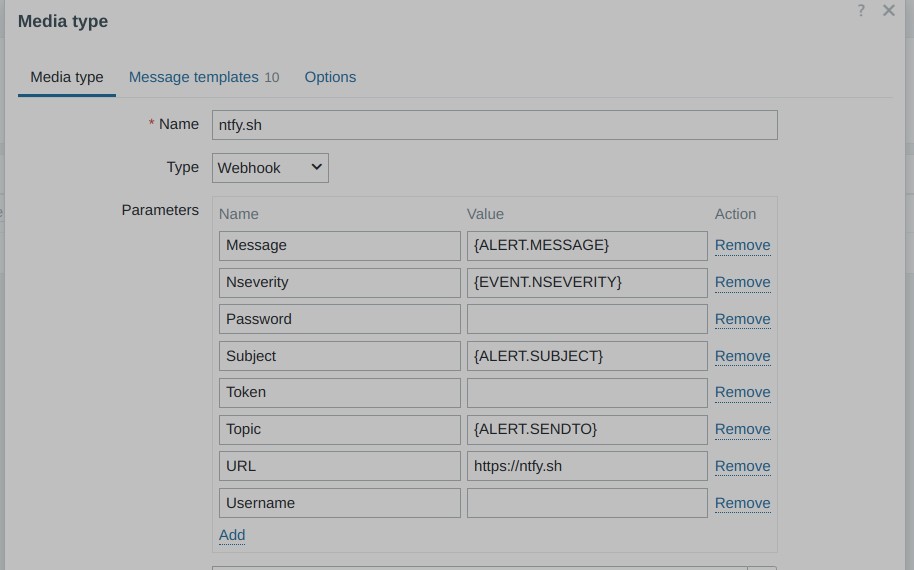
To pair it with Zabbix, a specific “mediatype” must be imported. You can find this in the following GitHub repository: torgrimt/zabbix-ntfy: Mediatype to add support for ntfy.sh services.
However, I found that the configuration of Ntfy’s mediatype in Zabbix is not well explained:
| Field | Comment |
|---|---|
| URL | Must contain the URL to the Ntfy server without “http://” or “https://”. For example, “ntfy.sh” is valid, but “https://ntfy.sh” is not valid. |
| Password, Token and Username | These fields must be empty if not needed. By “empty,” I mean nothing—remove even the macro reference if not used (even if the macro is empty). |
| Topic | Must contain the topic you want to use on the Ntfy server without any “/” character. |
Backup strategy
Because most things are defined “as code” and based on a desired state approach, my backup needs are lightweight and very targeted: “live” data.
I actually have three types of “live” data to back up:
- User files, hosted on a NAS (more on that later).
- Zabbix database: I haven’t yet found an elegant way to back up and restore automatically via states. For now, I do a simple “pg_dump” from time to time (I’m mostly interested in backing up the configuration more than data history).
- Kubernetes persistent volumes: This is what I will detail below.
My goal was to follow a KISS approach to make it easy to recover data in any circumstance. I mean “agnostic”: even if I had to change the infrastructure logic, hardware, containers, hypervisor, operating system, etc.
To achieve this, I based my implementation on ZFS volumes (prefixed by “pv_” for “Persistent Volumes”):
- Any “pv” is a ZFS volume created on all Proxmox nodes and mounted on all Kubernetes nodes.
- “pv” volumes are synchronized using “pvesync” at the hypervisor level.
- All “pv” volumes are backed up from node-1 (which has NL disks) by simply mounting them in read-only mode and creating a tar.gz archive.
- I keep 7 rolling backups for each volume.
More details on how these persistent volumes are handled are in the K3s chapter below.
Regarding the synchronization of ZFS volumes, “pvesync” works with a master/slave logic. In other words, it doesn’t handle bi-directional synchronization. This can be a problem because Kubernetes pods can freely move from one node to another. So, it’s necessary to determine which host holds the “master” ZFS volume in order to initiate synchronization accordingly.
After some research, I found that the best way to determine the “master” volume from the hypervisor was by checking the “bytes written” property of the ZFS volume. I based the selection of the “master” volume on the node where the ZFS volume has the highest “bytes written” value.
Here is the script. It determines the master node and then launches the synchronization if needed:
Click to expand code
#!/bin/bash

source /usr/local/bin/set_common.sh

### GLOBAL VARIABLES ###########################
VOLUME_PREFIX="pv_"
declare -A PV

### FUNCTIONS ##################################
Help()
{
   # Display Help
   echo
   echo "Syncronize all zfs volume that begin with '$VOLUME_PREFIX' with all given hosts"
   echo "All hosts are scanned and the source of each volume is determined by checking bytes written."
   echo
   echo "The host on which a volume has the highest number of written bytes is considered as the source."
   echo "All others hosts will be considered as destinations on which data must be updated"
   echo "If not change has been made on the volume, no operation is done"
   echo
   echo "This command depends on pve-zsync, it must be present and no check is done for that"
   echo
   echo "for each found volumes, the output will be:"
   echo "datetime  volume  written  source_host  status".
   echo ""
   echo "examples".
   echo "2024-11-09T19:01:02,506680931+01:00   zfs-storage/pv_myvolume  10.0.0.1=674537 / 10.0.0.1=7656 / => 10.0.0.1    OK".
   echo "2024-11-09T19:01:02,506680931+01:00   zfs-storage/pv_myvolume  10.0.0.1=0 / 10.0.0.2=0   no_change   OK".
   echo
   echo "status can be: OK, ERROR or SKIPPED (if source is not localhost)"
   echo
   echo "Syntax: $0 <host1> <host2> [host3 [...]]"
   echo
}

# $1 = zfs volume
# $2 = prefix
GetZFSSnapshots()
{
    prefix="$2"
    $prefix zfs list -H -t snapshot -o name -s creation | \grep "$1"
}

### SCRIPT LOGIC ################################

# Display help if needed
if [[ ($# -lt 2) || $1 == "help" ]] ; then
    Help
    exit 2
fi

# scan all zfs volume used as pv
for pv_path in $(zfs list -H | \grep pv_ | awk '{print $1}')
do
    echo -n "$(date -Ins)   $pv_path    "
    lastWrittenValue=0
    sourceHost=""

    # get amount of written bytes on all servers and set source host regarding the highest bytes written value
    for current_host in "$@"
    do
        # if not localhost, call command throught ssh
        prefix=""
        if [[ $(hostname --all-ip-addresses || hostname -I) != *"$current_host"* ]]; then
            prefix="ssh $current_host"
        fi

        # if this current scanned host has more written bytes for this volume, consider it as source
        written=$($prefix zfs get -H -p written $pv_path | awk '{print $3}')
        if [[ $written -gt $lastWrittenValue ]]; then
            sourceHost=$current_host
        fi

        echo -n "$current_host=$written / "

        lastWrittenValue=$written
        PV[$current_host]=$written
    done

    # if source host has not been determined, it means that no bytes have been written since the previous sync
    if [[ -z "${sourceHost}" ]]; then
        echo "=> no_change    OK"
        continue
    else
        #echo -n "${PV[$sourceHost]}    $sourceHost"
        echo -n "=> $sourceHost "
    fi

    # sync to all sources if sourceHost is localhost
    if [[ $(hostname --all-ip-addresses || hostname -I) == *"$sourceHost"* ]]; then
        for current_host in "$@"
        do
            if [[ $current_host != $sourceHost ]]; then
                # Synchronise from source to destination
                pve-zsync sync --source $pv_path --dest $current_host:$(dirname $pv_path) --maxsnap 5
                if [[ $? -eq 0 ]]; then
                    echo "  OK"
                else
                    echo "  ERROR"
                fi
            fi
        done
    else
        echo "  SKIPPED"
    fi
done

exit 0
This script runs every 5 minutes on each defined “pvhost” pillars (see bellow), which is acceptable for me as I have very few write operations on my containers. The probability of losing data because a pod might have been moved just after a write operation but before the next synchronization is very low. Through, I still have the opportunity to go as low as a sync every minute.
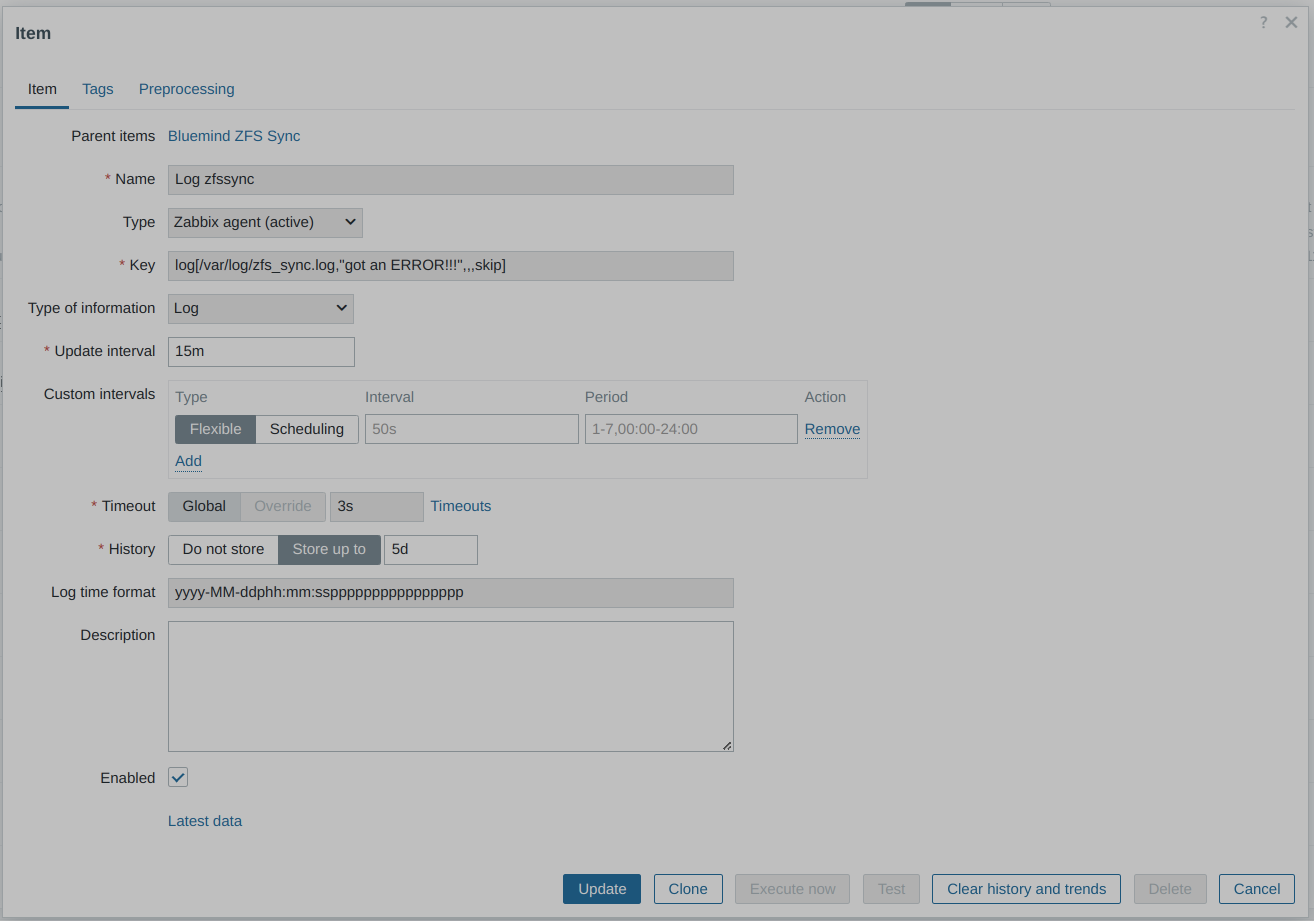
Even though it works very well, such a mechanism must be properly monitored to quickly detect any errors (e.g., network failure). Each call of the script logs the results in a file (/var/log/zfs_sync.log).
I created a dedicated Zabbix item and trigger to be sure I’m alerted by Ntfy in case of error:
After several months in production, I’ve never lost anything and haven’t experienced any filesystem corruption (I use ext4 on top of ZFS volumes). However, I did encounter some errors—not due to the mechanism itself, but because of the USB network adapter dedicated to the replication network on one of the nodes. This adapter is sometimes reset by the kernel.
Last but not least, persistent volumes are automatically created by states and defined in pillar values. I created another script to handle their creation. This script also takes care of automatically restoring any backup during the creation process. So, again, if I deleted everything, SaltStack will recreate all volumes with their latest available data.
Here is how I define a persistent volume in pillar:
Click to expand code
##############################################################
# Define zfs volumes to be used as persistents volumes in k3s
# size is in Gb
# scsiid must be unique for each volume
##############################################################
pvdef:
  mariadb:
    zfsmountpoint: zfs-storage
    size: 4
    fstype: ext4
    scsiid: 1

##############################################################
# Define zfs volumes to be used as persistents volumes in k3s
# size is in Gb
# scsiid must be unique for each volume
##############################################################
pvdef:
  mariadb:
    zfsmountpoint: zfs-storage
    size: 4
    fstype: ext4
    scsiid: 1

  mariadbbackup:
    zfsmountpoint: zfs-storage
    size: 1
    fstype: ext4
    scsiid: 5

##############################################################
# list of hosts ip addresses on which all persistents volumes
# must be synchronized through pve-zsync using zfs_sync.sh
# ipaddr: ip address used for zfs to send / receive sync data
# cronsync: cronexpression at which the host execute zfs_sync.sh
#
# WARNING: be sure that no host launch the sync at the same time !
#
##############################################################
pvhosts:
    hulk-1:
        ipaddr: 10.0.0.1
        cronsync: '0-59/10 * * * *'
    hulk-2:
        ipaddr: 10.0.0.2
        cronsync: '5-59/10 * * * *'

##############################################################
# list of persistants volumes and their Virtual Machine
# attachement (ID)
##############################################################
pvmap:
  mariadb: 1200
  mariadbbackup: 1200
How states handle the creation:
Click to expand code
# handle k3s persistent volumes creation
{% if pillar.get('pvmap', none) is not none %}
{% for app in pillar['pvmap'] %}
pv_{{ app }}_{{ grains['host'] }}:
    cmd.script:
        - name: /usr/local/bin/set_zfspv.sh
        - stateful: True
        - args: >
            zfsmountpoint={{ pillar['pvdef'][app]['zfsmountpoint'] }}
            appname={{ app }}
            size={{ pillar['pvdef'][app]['size'] }}
            fstype={{ pillar['pvdef'][app]['fstype'] }}
            vmid={{  pillar['pvmap'][app] }}
            scsiid={{ pillar['pvdef'][app]['scsiid'] }}

# try to restore a backup if persistent volume has just been created
{% if pillar.get('has_nas_storage', false) is true %}
pv_{{ app }}_{{ grains['host'] }}_restore:
    cmd.run:
        - names:
            - /usr/local/bin/nas.sh restore {{ pillar['pvdef'][app]['zfsmountpoint'] }} pv_{{ app }}
            - /usr/local/bin/zfs_sync.sh {% for pvhost in pillar['pvhosts'] %}{{ pvhost }} {% endfor %} >> /var/log/zfs_sync.log
        - onchanges:
            - cmd: pv_{{ app }}_{{ grains['host'] }}
{% endif %}

{% endfor %}
{% endif %}
How the states ensure ZFS persistent volumes are synchronized:
Click to expand code
{% if pillar.get('pvhosts', none) is not none %}
{% set currentlocalhost = grains['localhost'] %}

iac_zfssync_packages:
  pkg.installed:
    - pkgs:
      - pve-zsync

iac_zfssync_cmd:
  file.managed:
    - names:
      - /usr/local/bin/zfs_sync.sh:
        - source: salt://iac_backend/files/zfs_sync.sh
        - mode: 750
      - /etc/logrotate.d/zfs_sync:
        - source: salt://iac_backend/files/zfs_sync.logrotate
        - mode: 644

iac_zfssync_cronjob:
  schedule.present:
    - function: cmd.run
    - job_args:
      - '/usr/local/bin/zfs_sync.sh {% for pvhost in pillar['pvhosts'] %}{{ pillar['pvhosts'][pvhost]['ipaddr'] }} {% endfor %} >> /var/log/zfs_sync.log'
    - maxrunning: 1
    - cron: '{{ pillar['pvhosts'][currentlocalhost]['cronsync'] }}'

{% endif %}
The script beneath the states (/usr/local/bin/set_zfspv.sh, which is statefull compliant):
Click to expand code
#!/bin/bash

source /usr/local/bin/set_common.sh

### GLOBAL VARIABLES ###########################
VOLUME_PREFIX="pv_"
MANDATORY="zfsmountpoint appname size fstype vmid scsiid"

### FUNCTIONS ##################################
Help()
{
   # Display Help
   echo
   echo "Unsure a ZFS volume for kubernetes PV exists and is provided to guest VM"
   echo "Either create and provide it, or do nothing"
   echo
   echo "Syntax: $0 parameter1=value1 paramter2=value2 ..."
   echo
   echo "where valid parameters are (all are mandatory):"
   echo "  zfsmountpoint:  root zfs mountpoint on which to create the volume"
   echo "  appname:        name of the application in kubernetes (eg. mariadb)"
   echo "  size:           size of the volume (eg. 8 for 8 Gigabytes)"
   echo "  fstype:         filesystem to use to format the partition (eg. ext4)"
   echo "  vmid:           VMID of the VM to which the volume must be added"
   echo "  scsiid:         SCSI disk number to use on guest VM (eg. 1 for scsi1) "
   echo
}

### SCRIPT LOGIC ################################

# Display help if needed
if [[ ($# -lt 6) || $1 == "help" ]] ; then
    Help
    exit 2
fi

ParseParameters "$@"
CheckMandatory

ZFSVolumePath="${arguments['zfsmountpoint']}/${VOLUME_PREFIX}${arguments['appname']}"
ZFSBlockDevice="/dev/zvol/$ZFSVolumePath"
ZFSBlockDevicePart1="${ZFSBlockDevice}-part1"
MkfsCMD="mkfs.${arguments['fstype']}"
ProductName="${VOLUME_PREFIX}${arguments['appname']}"

# create volume, partition and format it if not exists
if [[ ! -b "$ZFSBlockDevice" ]]; then
    # Create ZFS volume
    zfs create -V ${arguments['size']}G $ZFSVolumePath
    if [[ ! $? -eq 0 ]]; then
        CHANGED="no"
        COMMENT="Error creating zfs volume $ZFSVolumePath"
        ExitMessage 1
    fi

    # create one partition the volume
    while [ ! -b "$ZFSBlockDevice" ]; do
        sleep 1
    done
    parted "$ZFSBlockDevice" -- mklabel msdos
    parted -a minimal "$ZFSBlockDevice" -s -- mkpart primary 0 -1
    if [[ ! $? -eq 0 ]]; then
        CHANGED="no"
        COMMENT="Error creating partition on zfs volume ${VOLUME_PREFIX}${arguments['appname']}"
        ExitMessage 1
    fi

    # format the new partition when it appears
    while [ ! -b "$ZFSBlockDevicePart1" ]; do
        sleep 1
    done
    sleep 2 # still need to wait a bit for the part to settle
    $MkfsCMD "$ZFSBlockDevicePart1"
    if [[ ! $? -eq 0 ]]; then
        CHANGED="no"
        COMMENT="Error with $MkfsCMD $ZFSBlockDevicePart1"
        ExitMessage 1
    fi

    CHANGED="yes"
    COMMENT="$ZFSVolumePath created."
else
    CHANGED="no"
    COMMENT="$ZFSVolumePath already exists."
fi

# add volume as disk to the guest VM
if [[ "$(qm config ${arguments['vmid']} | grep ${arguments['appname']})" != *"${arguments['appname']},"* ]]; then
    qm set ${arguments['vmid']} --scsi${arguments['scsiid']} $ZFSBlockDevice,ssd=1,product="$ProductName"
    if [[ ! $? -eq 0 ]]; then
        CHANGED="no"
        COMMENT="Error adding $ZFSBlockDevice as scsi${arguments['scsiid']} on VM ${arguments['vmid']}"
        ExitMessage 1
    fi

    CHANGED="yes"
    COMMENT="$COMMENT Disk scsi${arguments['scsiid']} added to VM ${arguments['vmid']}"
else
    CHANGED="no"
    COMMENT="$COMMENT Guest ${arguments['vmid']} already use it"
fi

# print saltstack readble message then exit with success
ExitMessage 0
You can also see a call to a script named “/usr/local/bin/nas.sh”, it will be detailled later.
Automatic updates
As of writing, all my LXC and virtual machines are based on Debian 12. Thus I deployed unnattended upgrade on all of hosts via a simple state, based on the official documentation:
autoupdate_packages_debian:
  pkg.installed:
    - pkgs:
      - unattended-upgrades
      - apt-listchanges

/etc/apt/apt.conf.d/52unattended-upgrades-local:
  file.managed:
    - source: salt://sysadmin/files/52unattended-upgrades-local
    - mode: 640

/etc/apt/apt.conf.d/02periodic:
  file.managed:
    - source: salt://sysadmin/files/apt_conf_02periodic
    - mode: 640
However, I choosed not to apply automated upgrade on Proxmox nodes as it may cause serious issues due to breaking changes (eg. change in network cards names).
Real life use cases
NAS
As explained previously, one of the nodes (node-1) has two 8-terabyte hard drives. The main purpose is to build a NAS, primarily to offer Samba shares that host music, movies, office files, backups, etc.
One disk is “live,” and the other is used solely as a mirror/backup. The mirror disk is switched off most of the time and is even removed when I leave home for more than two days.
The mirroring is handled on the hypervisor side with the help of a custom script. This script also manages ZFS persistent volume backups and restores, and it can generate email reports.
Click to expand code
#!/bin/bash

### GLOBAL VARIABLES ###########################
LOG_TMP_FILE="/tmp/nas_last_sync.log"
SYNC_SOURCE="/nas-storage"
SYNC_DEST="/nas-mirror"
BACKUP_DIR="$SYNC_SOURCE/backup"
DATE_FORMAT="/bin/date +%d.%m.%Y-%H:%M:%S"
SUBJECT_SYNC="NAS Sync result"
SUBJECT_REPORT="NAS storage report"
SUBJECT_BACKUP="NAS zfs pv_* backup"
SUBJECT_RESTORE="NAS zfs pv_* restore"
MIRROR_DISK_LABEL="NAS-MIRROR"
VOL_TO_RESTORE=""
ZFS_POOL=""
BACKUP_NB=4
NL=$'\n'

### FUNCTIONS ##################################
Help()
{
   # Display Help
   echo
   echo "Perform NAS operations on NL disks"
   echo
   echo "Syntax: $0 <command>"
   echo "where command can be"
   echo "- sync:    launch disks synchdonisation"
   echo "- report:  build usage report and send it"
   echo "- backup:  backup all zfs pv_* volumes to $BACKUP_DIR"
   echo "- restore <zfs pool> <vol>: restore content of vol from $BACKUP_DIR"
   echo "- help:    display this message"
   echo
}

# send a email to sysadmin
# $1 = subject
# $2 = content (string or file)
mailadmin()
{
  if [ -f "$2" ]; then
    mail -s "$1" root < "$2"
  else
    echo "$2" | mail -s "$1" root
  fi
}

# umount, send mail then exit with given code
# $1 = exit code
# $2 = path to umount
# $3 = subject
# $4 = content (string or file)
mailandexit()
{
    if [[ ! -z "$2" ]];then
        umount -q $2
    fi
    mailadmin "$3" "$4"
    exit $1
}

# snychornize nas-storage to nas-mirror if disk is present
Sync()
{
    if [ -e /dev/disk/by-label/$MIRROR_DISK_LABEL ] ; then
        mount -v $SYNC_DEST > "$LOG_TMP_FILE" 2>&1

        echo "---------------------------------------------------------" >> "$LOG_TMP_FILE"
        rsync -a -v --delete-after $SYNC_SOURCE/ $SYNC_DEST/ | awk '{ print "['$($DATE_FORMAT)'] " $0 }' >> "$LOG_TMP_FILE" 2>&1
        echo "---------------------------------------------------------" >> "$LOG_TMP_FILE"

        umount -v $SYNC_DEST >> "$LOG_TMP_FILE" 2>&1

        mailadmin "$SUBJECT_SYNC" "$LOG_TMP_FILE"
    fi
}

# generate a simple usage report of nas storage
Report()
{

    message="$(df -h $SYNC_SOURCE)"
    message="$message$NL --------------------------------------------------------------$NL"
    for dir in $(ls $SYNC_SOURCE)
    do
        message="$message $(du -h -d 1 $SYNC_SOURCE/$dir)$NL$NL"
    done

    mailadmin "$SUBJECT_REPORT" "$message"
}

# backup all zfs pv_* vol
backup_zfspv()
{
    message="ZFS pv_* backup:$NL"
    message="$message --------------------------------------------------------------$NL"

    for pv_path in $(zfs list -H | \grep pv_ | awk '{print $1}')
    do
        mountpath="/dev/zvol/${pv_path}-part1"
        base="$(basename $pv_path)"
        filename="$base-$(date -I).tar.gz"
        message="$message  $filename  "

        # do nothing if backup destination already exists
        if [[ -f "$BACKUP_DIR/$filename" ]]; then
            message="$message INFO: file already exists $NL"
            continue
        fi

        # mount the source to backup
        mkdir -p /media/$pv_path
        mount -o ro $mountpath /media/$pv_path
        if [[ ! $? -eq 0 ]]; then
            message="$message ERROR: could not mount $mountpath $NL"
            continue
        fi

        # if volume is empty, do nothing
        if [[ $(ls /media/$pv_path | wc -l) -lt 2 ]] then
            message="$message INFO: empty source, nothing done $NL"
            umount /media/$pv_path
            continue
        fi

        # do the backup
        cd /media/$pv_path
        tar -czf "$BACKUP_DIR/$filename" *
        if [[ ! $? -eq 0 ]]; then
            message="$message ERROR: creating tar.gz archive on $BACKUP_DIR $NL"
            umount /media/$pv_path
            continue
        fi

        # report size
        message="$message$(du -h "$BACKUP_DIR/$filename" | awk '{print $1}') $NL"
        cd ..
        umount /media/$pv_path
        if [[ $? -eq 0 ]]; then
            rmdir /media/$pv_path
        fi

        # if there are more backup files than BACKUP_NB, delete the oldest
        if [[ $(ls $BACKUP_DIR/$base* | wc -l) -gt $BACKUP_NB ]] then
            file_to_delete=$(ls $BACKUP_DIR/$base* | sort | head -1)
            rm $file_to_delete
        fi
    done

    mailadmin "$SUBJECT_BACKUP" "$message"
}

# restore a given zfs volume
restore_zfspv()
{
    if [[ -z "$VOL_TO_RESTORE" || -z "$ZFS_POOL" ]]; then
        Help
        exit 0
    fi

    message="Restore $VOL_TO_RESTORE:$NL"
    message="$message --------------------------------------------------------------$NL"

    # get lastest backup if any
    file_to_restore=$(ls $BACKUP_DIR/$VOL_TO_RESTORE* 2>/dev/null | sort -r | head -1)
    if [[ ! -f $file_to_restore ]]; then
        message="$message INFO: no backup found in $BACKUP_DIR"
        mailandexit 0 "" "$SUBJECT_RESTORE" "$message"
    fi

    # mount vol to restore
    mountpath="/dev/zvol/${ZFS_POOL}/${VOL_TO_RESTORE}-part1"
    mkdir -p /media/$VOL_TO_RESTORE
    mount $mountpath /media/$VOL_TO_RESTORE
    if [[ ! $? -eq 0 ]]; then
        message="$message ERROR: could not mount $mountpath"
        mailandexit 1 /media/$VOL_TO_RESTORE "$SUBJECT_RESTORE" "$message"
    fi

    # if volume not empty, do nothing
    if [[ $(ls /media/$VOL_TO_RESTORE | wc -l) -gt 2 ]] then
        message="$message WARN: target not empty, nothing done $NL"
        mailandexit 0 /media/$VOL_TO_RESTORE "$SUBJECT_RESTORE" "$message"
    fi

    # restore
    message="$message $(tar -zxvf $file_to_restore -C /media/$VOL_TO_RESTORE/)$NL$NL"
    if [[ ! $? -eq 0 ]]; then
        message="$message ERROR: could not restore $file_to_restore"
        mailandexit 1 /media/$VOL_TO_RESTORE "$SUBJECT_RESTORE" "$message"
    fi

    # umount
    umount /media/$VOL_TO_RESTORE
    if [[ $? -eq 0 ]]; then
        rmdir /media/$VOL_TO_RESTORE
    fi

    message="$message restored $file_to_restore into $mountpath $NL"
    mailadmin "$SUBJECT_RESTORE" "$message"
}

### SCRIPT LOGIC ################################
case "$1" in
    sync)
        Sync
        ;;
    report)
        Report
        ;;
    backup)
        backup_zfspv
        ;;
    restore)
        ZFS_POOL="$2"
        VOL_TO_RESTORE="$3"
        restore_zfspv
        ;;
    *)
        Help
        ;;
esac
In additions, most important files are also synchronized on Onedrive which is monitored via a custom log item plus a trigger in Zabbix for the file “/var/log/onedrive”
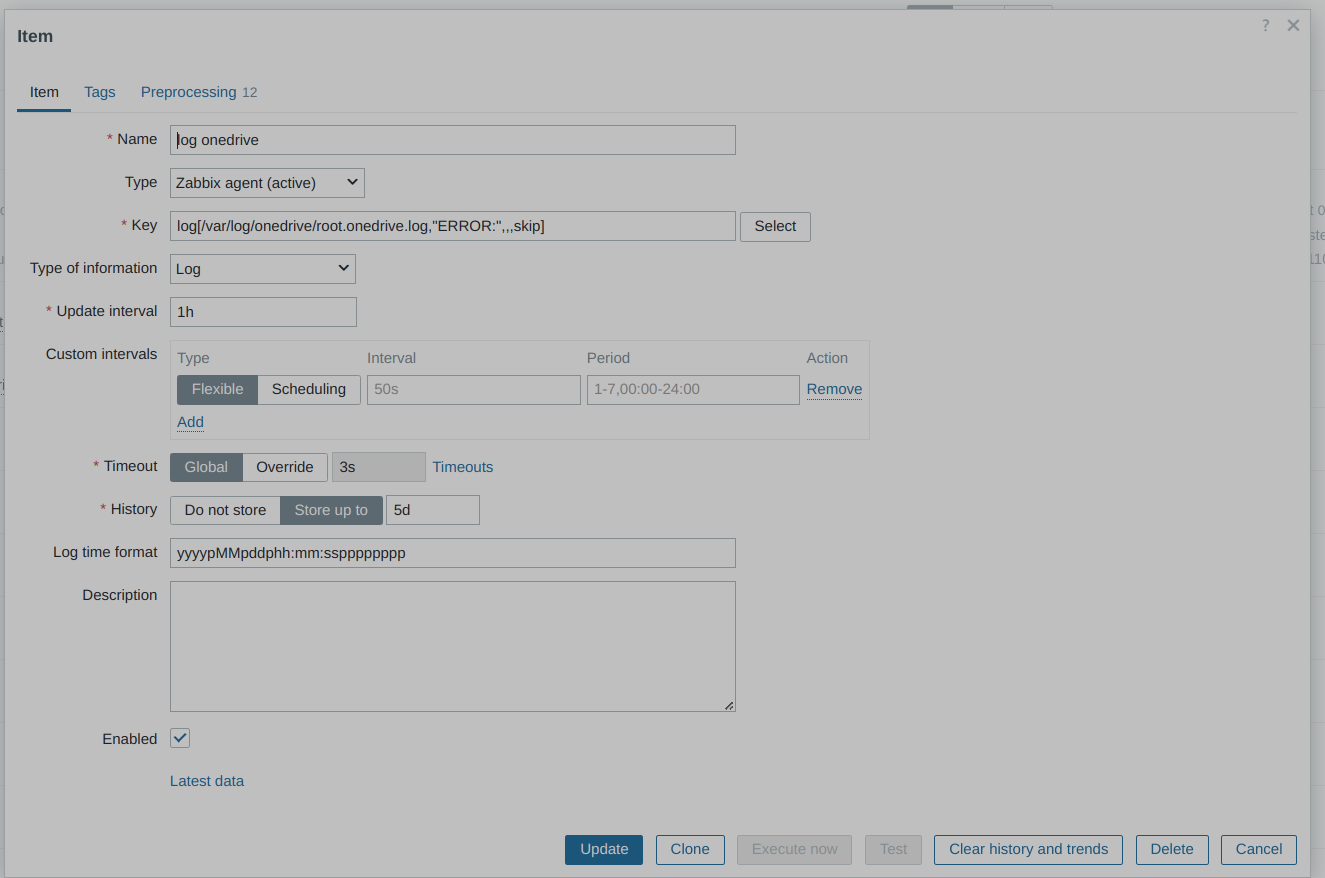
The NAS service itself is provided by a dedicated LXC on node-1. This LXC uses the “online” hard disk to provides SMB shares on a VLAN dedicated to users. Users confguration has been covered in the previous chapter “Users management”.
The state that configure the LXC is pretty simple:
# source : https://wiki.archlinux.fr/Samba + https://wiki.debian.org/Avahi
# install samba
filesrv_packages:
  pkg.installed:
    - pkgs:
      - samba
      - avahi-daemon
      - wsdd

# custom configuration file
/etc/samba/smb.conf:
  file.managed:
    - source: salt://services/files/smb.conf
    - user: root
    - group: root
    - mode: 644

# ensure service is active and running
smbd:
  service.running:
    - enable: True
    - watch:
      - file: /etc/samba/smb.conf

nmbd:
  service.running:
    - enable: True
    - watch:
      - file: /etc/samba/smb.conf

wsdd:
  service.running:
    - enable: True

avahi-daemon:
  service.running:
    - enable: True
Reverse proxy and WAF
As explained later, I have a Kubernetes cluster on which some exposed services are running. These services are behind an Nginx server that serves as a reverse proxy, SSL offloading, and a web application firewall thanks to NAXSI.
Nginx is fully deployed on a dedicated LXC running on node-2 via a couple of states.
Below is an example of pillar values to set up Nginx. Crypto keys are encrypted with GPG:
Click to expand code
#!jinja|yaml|gpg

##############################################################
# reverse proxy configuration with in-memory cache
# secrets are encrypted with GPG
#
# rproxy_conf :
# - ssl_certificate and ssl_certificate_key are GPG encrypted data for let's encrypt. Wildcard certificate is assumed (same for all sites)
#
# rproxy_sites:
# - type: used for specific settings and naxsi rules file name naxsi_<type>.rules
#
##############################################################

rproxy_conf:
  naxsi_package: https://github.com/wargio/naxsi/releases/download/1.6/debian-bookworm-libnginx-mod-http-naxsi_1.6_amd64.deb
  worker_connections: 512   # maximum number of simultaneous connections that can be opened by a worker process
  resolver: aaa.bbb.ccc.ddd  # ip address of dns server to use to resolve backend fqdn
  cache_max_age: 14d        # delete file older than x days
  cache_max_size: 400m      # maximum size the cache can take ()
  dh4096: |
    -----BEGIN PGP MESSAGE-----

    [...]
    -----END PGP MESSAGE-----

  ssl_certificate: |
    -----BEGIN PGP MESSAGE-----

    [...]
    -----END PGP MESSAGE-----

  ssl_certificate_key: |
    -----BEGIN PGP MESSAGE-----

    [...]
    -----END PGP MESSAGE-----

rproxy_certbot:
  rsa-key-size: 4096
  cert-name: all-sites
  email: registered@email.com
  domains: www.mydomain.com,www.myother-domain.org
  deploy-hook: systemctl restart nginx

rproxy_sites:
  mydomain.com:
    type: wordpress
    cache_static_files: enabled
    cache_dynamic_files: enabled
    backends:
      - k3s-master-1.local.lan:8001
      - k3s-master-2.local.lan:8001

  myother-domain.org:
    type: wordpress
    cache_static_files: enabled
    cache_dynamic_files: enabled
    backends:
      - k3s-master-1.local.lan:8002
      - k3s-master-2.local.lan:8002
And here it the state file:
Click to expand code
##############################################################
# Deploy everything that is required to run nginx as a reverseproxy + waf + cache:
# - needed packages
# - external deb package for naxsi extention
# - custom config for nginx service in order to create /run/nginx directory for tmpfs caching
# - install naxsi rules files and cache configurations
# - make custom nginx config file regarding pillar values
# - set let's encrypt required certiitates file based on pillar GPG encrypted values
# - create site configuration file for each site declared in pillar
# - set a cronjob that runs certbot everyday to try to renew the wildcards certificate
##############################################################

# install packages
rproxy_packages:
  pkg.installed:
    - pkgs:
      - nginx
      - certbot
      - python3-certbot-nginx

# install naxsi extention, assume debian host
rproxy_sources_packages:
  cmd.run:
    - name: wget {{ pillar['rproxy_conf']['naxsi_package'] }} -O /root/naxsi.deb && dpkg -i /root/naxsi.deb && rm /root/naxsi.deb
    - unless: test -f /usr/lib/nginx/modules/ngx_http_naxsi_module.so

# tune systemd nginx service config
rproxy_systemd_config:
  file.managed:
    - name: /etc/systemd/system/nginx.service.d/custom-service.conf
    - source: salt://services/files/rproxy/custom-service.conf
    - makedirs: True

# install available naxsi rules
rproxy_naxsi_rules:
  file.recurse:
    - name: /etc/nginx/naxsi-rules
    - source: salt://services/files/rproxy/naxsi-rules

# install available reverse proxy cache configurations
rproxy_cache_conf:
  file.recurse:
    - name: /etc/nginx/reverse-conf
    - source: salt://services/files/rproxy/reverse-conf

# deploy nginx configuration
rproxy_conf:
  file.managed:
    - name: /etc/nginx/nginx.conf
    - source: salt://services/files/rproxy/nginx.conf
    - template: jinja
    - context:
      worker_connections: {{ pillar['rproxy_conf']['worker_connections'] }}
      resolver: {{ pillar['rproxy_conf']['resolver'] }}
      cache_max_age: {{ pillar['rproxy_conf']['cache_max_age'] }}
      cache_max_size: {{ pillar['rproxy_conf']['cache_max_size'] }}

# let's encrypte cert files
rproxy_dh4096:
  file.managed:
    - name: /etc/nginx/dh4096.pem
    - contents: |-
        {{ pillar['rproxy_conf']['dh4096'] | indent(8) }}

rproxy_fullchain:
  file.managed:
    - name: /etc/letsencrypt/live/all-sites/fullchain.pem
    - makedirs: True
    - contents: |-
        {{ pillar['rproxy_conf']['ssl_certificate'] | indent(8) }}

rproxy_privkey:
  file.managed:
    - name: /etc/letsencrypt/live/all-sites/privkey.pem
    - makedirs: True
    - contents: |-
        {{ pillar['rproxy_conf']['ssl_certificate_key'] | indent(8) }}

# generate config files for each declared site
{% for site in pillar['rproxy_sites'] %}
rproxy_site_{{ site }}:
  file.managed:
    - name: /etc/nginx/sites-enabled/{{ site }}.conf
    - source: salt://services/files/rproxy/sites-enabled.conf
    - makedirs: True
    - template: jinja
    - context:
      site: {{ site }}
{% endfor %}

# ensure nginx is running
rproxy_service:
  service.running:
    - name: nginx
    - enable: True
    - restart: True
    - watch:
      - file: /etc/nginx/nginx.conf
      - file: /etc/nginx/sites-enabled/*

# auto renew let's encrypt certificate
rproxy_certbot:
  schedule.present:
    - function: cmd.run
    - job_args:
      - 'certbot --nginx --agree-tos --hsts --staple-ocsp --rsa-key-size {{ pillar['rproxy_certbot']['rsa-key-size'] }} --cert-name {{ pillar['rproxy_certbot']['cert-name'] }} --email {{ pillar['rproxy_certbot']['email'] }} --domains {{ pillar['rproxy_certbot']['domains'] }}'
    - maxrunning: 1
    - cron: '0 5 * * *'
I’m not going to share all my nginx configuration files, but as you can see I use a generic “site-enabled.conf” which is a jinja template.
k3s cluster
Create the cluster
If you’ve managed to read the previous chapters and reached this line, you probably already know how my K3S cluster is deployed and configured: via states and pillar values.
Node-1 and node-2 are primarily used to host services that require high performance or persistence. Node-3 can handle smaller workloads but, more importantly, serves as a third Etcd instance. While it’s not mandatory with K3s, it provides additional security.
Below is a compilation of all the pillar values needed to configure the cluster. Of course, they must be distributed across several files to assign values to specific hosts (e.g., first master, simple node, etc.).
Pillar values :
Click to expand code
##############################################################
# k3s common settings for all nodes ofthe cluster
# url: base url where to get k3s binaries from
# test: file to check to choose weither k3s install should be done
# tocken: gpg encrypted needed token to join the cluster
# echo -n 'value to encrypt' | gpg --homedir /etc/salt/gpgkeys --trust-model always -ear unique_ear_key
##############################################################
k3s-common:
  url: https://get.k3s.io
  test: test -x /usr/local/bin/k3s
  token: |
    -----BEGIN PGP MESSAGE-----

    [...]
    -----END PGP MESSAGE-----

##############################################################
# k3s first master of the cluster.
# A server (not lxc) must exists on local.lan
#
# Any other node of the cluster will first have to connect to this one
# Install: command to run in order to deploy k3s on this master node
##############################################################
k3s-master:
  install: sh -s - server --cluster-init --write-kubeconfig-mode=644 --tls-san k3s-master-1.local.lan

##############################################################
# k3s master definition for all nodes.
#
# master: fqdn of the first k3s master
##############################################################
k3s-node:
  master: k3s-master-1.local.lan
The following states take care of installing either a primary master or a node, depending on available pillar values:
Click to expand code
##############################################################
# Deploy k3s cluster regarding k3s-* pillars.
# - The role of the node is defined by its name (k3s-agent-*, k3s-master-*, k3s-server-*)
# - The 1st master will be used to add all other nodes
# - A custom udev rule is added to all nodes that can handle persistent volumes:
#   Any scsi disk with a product name that starts with "pv_" is
#   mounted as /media/pv_<name> on all PV enabled hosts
#
##############################################################
{% if grains['host'].startswith('k3s-agent')        %}
{%   set role='agent'                               %}
{% elif pillar.get('k3s-master', none) is not none  %}
{%   set role=''                                    %}
{% else                                             %}
{%   set role='server'                              %}
{% endif                                            %}

k3s_dependencies:
  pkg.installed:
    - pkgs:
      - ca-certificates

{% if pillar.get('k3s-master', none) is not none %}
k3s_install_{{ grains['host'] }}:
  cmd.run:
    - name: wget -q -O - {{ pillar['k3s-common']['url'] }} | {{ pillar['k3s-master']['install'] }} {% for label in pillar['k3s-labels'] %}{{ ' --node-label ' + label + '=' ~ pillar['k3s-labels'][label] }} {% endfor %} --token {{ pillar['k3s-common']['token'] }}
    - unless: {{ pillar['k3s-common']['test'] }}
    - require:
      - pkg: k3s_dependencies
{% endif %}

{% if pillar.get('k3s-node', none) is not none %}
k3s_install_{{ grains['host'] }}:
  cmd.run:
    - name: wget -q -O - {{ pillar['k3s-common']['url'] }} | K3S_URL="https://{{ pillar['k3s-node']['master'] }}:6443" K3S_TOKEN="{{ pillar['k3s-common']['token'] }}" sh -s - {{ role }} {% for label in pillar['k3s-labels'] %}{{ ' --node-label ' + label + '=' ~ pillar['k3s-labels'][label] }} {% endfor %}
    - unless: {{ pillar['k3s-common']['test'] }}
    - require:
      - pkg: k3s_dependencies
{% endif %}

{% if pillar['k3s-labels']['pv'] == 'enabled' %}
k3s_install_udev:
  file.managed:
    - names:
      - /etc/udev/rules.d/80-pv-disks.rules:
        - source: salt://services/files/80-pv-disks.rules
        - mode: 640
  cmd.run:
    - name: udevadm control --reload-rules && udevadm trigger
    - onchanges:
      - file: /etc/udev/rules.d/80-pv-disks.rules

{% endif %}

k3s_running:
  service.running:
    {% if role == 'agent' -%}
    - name: k3s-agent
    {% else -%}
    - name: k3s
    {% endif -%}
    - enable: True
    - require:
      - cmd: k3s_install_{{ grains['host'] }}
As you can see, a special udev rule file (80-pv-disks.rules) is installed on all K3S nodes with the pillar value “k3s-label:pv”. More on than on the next chapter.
Manage persistence
I’ve already touched on the subject of persistent volumes in the “Backup and Restore” chapter. The concept is to use ZFS volumes that are mirrored between node-1 and node-2.
These ZFS volumes are mounted as SCSI devices on K3s hosts. They are then automatically mounted and unmounted via udev rules (80-pv-disks.rules). The purpose of “automount” is to prevent the same volume from being mounted simultaneously on two different nodes, thereby avoiding filesystem corruption. The auto-unmount timeout is set to a relatively short value (5 seconds).
Now, you might ask: where/how should these SCSI volumes be mounted so that K3s pods can recognize their names? The trick is to use the SCSI property “product,” which you may have already seen in the script set_zfspv.sh.
For example, I have a ZFS volume named pv_mariadb on the hypervisor side. This volume is presented as a SCSI device on all nodes with a command like:
qm set 1200 --scsi0 /dev/zvol/zfs-storage/pv_mariadb-part1,ssd=1,product="pv_mariadb"
Then, on all hosts with the pillar value k3s-label:pv , there is a set of udev rules that automatically mount all SCSI devices and create mount points according to the SCSI property “product” (exposed as “ID_MODEL” by udev). For example, /media/pv_mariadb. This way, I can define a pod that references a local storage path, and no matter where the pod is deployed, the data will be accessible.
Below are the udev rules :
# create mount dir
ACTION=="add", KERNEL=="sd[a-z]?", ENV{ID_MODEL}=="pv_*", RUN+="/bin/mkdir -p /media/%E{ID_MODEL}"
KERNEL=="sd[a-z]?", ENV{ID_MODEL}=="pv_*", RUN+="/bin/mkdir -p /media/%E{ID_MODEL}"
# set automount: all kube pv with reside in /media/pv_xxx
ACTION=="add", KERNEL=="sd[a-z]?", ENV{ID_MODEL}=="pv_*", RUN+="/usr/bin/systemd-mount --no-block --automount=yes --timeout-idle-sec=5s --collect $devnode /media/%E{ID_MODEL}"
KERNEL=="sd[a-z]?", ENV{ID_MODEL}=="pv_*", RUN+="/usr/bin/systemd-mount --no-block --automount=yes --timeout-idle-sec=5s --collect $devnode /media/%E{ID_MODEL}"

# if device is removed, umount it...
ACTION=="remove", KERNEL=="sd[a-z]?", ENV{ID_MODEL}=="pv_*", RUN+="/usr/bin/systemd-mount -u /media/%E{ID_MODEL}"
# ... then remove mount dir
ACTION=="remove", KERNEL=="sd[a-z]?", ENV{ID_MODEL}=="pv_*", RUN+="/bin/rmdir /media/%E{ID_MODEL}"
And here is a example of a persistent volume definition for K3S (additional nodeAffinity may be required):
apiVersion: v1
kind: PersistentVolume
metadata:
  name: mariadb-data-pv
  namespace: prod
spec:
  capacity:
    storage: 3500M
  volumeMode: Filesystem
  accessModes:
  - ReadWriteOnce
  persistentVolumeReclaimPolicy: Retain
  storageClassName: local-storage
  claimRef:
    name: mariadb-data-pv-claim
    namespace: prod
  local:
    path: /media/pv_mariadb
By combining this mechanism with the backup and desired-state approach I explained earlier, I can delete any SCSI volume (e.g., qm set 1200 --delete scsi0) or even destroy the ZFS volume (e.g., zfs destroy zfs-storage/pv_mariadb). Everything will be automatically reconstructed and restored, either by manually running salt '*' state.apply or by waiting a bit, as the same command is automatically executed on a regular basis.
Application deployment
Deploying applications in Kubernetes “as code” is done with YAML files that include various definitions (volumes, services, containers, deployments, etc.). To maintain a GitOps approach, all applications deployed in my K3s cluster are based on pillar values and states.
The concept is that all Kubernetes definition YAML files are managed by SaltStack, which is also responsible for running kubectl apply. By “definition files,” I mean not only application deployments but also namespaces, secrets, and custom images. As mentioned earlier, any push of a new or modified file to the Git repository triggers a “highstate apply.” Thus, any newly added YAML file is automatically applied to the K3s cluster.
However, removing a pod is not (yet?) handled automatically. I haven’t implemented that for now, but it shouldn’t be complicated (pillar value + dedicated state that could trigger a kubectl delete).
Here is an exemple of pillar values I can use:
Click to expand code
#!yaml|gpg

##############################################################
# List of applications that are deployed on kubernetes cluster
# The name must correspond to a kube yaml definitions file on
# salt/kubeapps/files.
#
# yaml files are managed on all k3s server nodes in /root
#
# e.g: "mariadb" will trigger kubectl apply -f /root/mariadb.yaml
#
# kubesecrets part is used to create secrets in k3s cluster
# secrets are base64 encoded then encrypted with gpgp
# echo -n 'value to encrypt' | base64 | gpg --homedir /etc/salt/gpgkeys --trust-model always -ear unique_ear_key
##############################################################
kubeapps:
  - mariadb
  - mariadbbackup

kubesecrets:
  prod:
    mariadbpwd: |
      -----BEGIN PGP MESSAGE-----

      [...]
      -----END PGP MESSAGE-----

##############################################################
# k3s docker images to install on all nodes
#
# expected format of docker image name: <name>-<version>
#
# install: list of image to install
# remove: list of image to delete (the '-' is replaced by ':' when trying to remove)
# prefix is used to remove images, adding this value to the image name:version
##############################################################
k3s-images:
  prefix: docker.io/library/
  install:
    wordpress-v2024.11.17: https://github.com/jit06/docker-images/releases/download/wordpress/wordpress-v2024.11.17.tar.gz
  remove:
    - wordpress-v2024.11.16
    - wordpress-latest
And below the states that manage namespaces, custom images installation, secrets and applications deployments:
Click to expand code
##############################################################
# installation and removall of docker images to local repository
# image to install is expected to be a gziped tar archive
##############################################################
# install
{% for image in pillar['k3s-images']['install'] %}
{{ image }}_install:
  cmd.run:
    - name: wget -q -O - {{ pillar['k3s-images']['install'][image] }} | gzip -d - | ctr image import -
    - unless: test -n "$(ctr images ls | grep {{ image.replace('-',':') }})"
{% endfor %}

# remove
{% for image in pillar['k3s-images']['remove'] %}
{{ image }}_remove:
  cmd.run:
    - name: ctr images del {{ pillar['k3s-images']['prefix'] }}{{ image.replace('-',':') }}
    - unless: test -z "$(ctr images ls | grep {{ image.replace('-',':') }})"
{% endfor %}

##############################################################
# Handle installation and deployment of apps in k3s cluster
# This state should only be applied on a k3s master.
#
# The list of apps to deploy are checked in 'kubeapps' pillar
# for each apps:
# - the yaml definition from files/<appname>.yaml is copied to /root
# - the yaml file is applied via kubectl unless app is already installed
##############################################################
# create / refresh namespaces
kubeapps_namespaces:
  file.managed:
    - name: /root/namespaces.yaml
    - source: salt://kubeapps/files/namespaces.yaml
  cmd.run:
    - name: kubectl apply -f /root/namespaces.yaml

# create / refresh secrets than remove the file
kubeapps_secrets:
  file.managed:
    - name: /root/secrets.yaml
    - source: salt://kubeapps/files/secrets.yaml
    - template: jinja
  cmd.run:
    - name: kubectl apply -f /root/secrets.yaml

# deploy kubapps if not running
{% for app in pillar['kubeapps'] %}
{{ app }}_{{ grains['host'] }}:
  file.managed:
    - name: /root/{{ app }}.yaml
    - source: salt://kubeapps/files/{{ app }}.yaml
    - template: jinja
    - mode: 600

apply_{{ app }}_{{ grains['host'] }}:
  cmd.run:
    - name: kubectl apply -f /root/{{ app }}.yaml
    - unless: test -n "$(kubectl get pods | grep {{ app }})"
{% endfor %}
Finally, here is an example of my MariaDB definition to be deployed on the cluster, which also embed phpMyAdmin (yes, they shoud be on separates pods…):
Click to expand code
#######################################
# Services
#######################################
---
apiVersion: v1
kind: Service
metadata:
  name: mariadb-internal-service
  namespace: prod
spec:
  selector:
    app: mariadb
  ports:
    - protocol: TCP
      port: 3306
      targetPort: 3306
---
apiVersion: v1
kind: Service
metadata:
  name: phpmyadmin-service
  namespace: prod
spec:
  selector:
    app: mariadb
  type: LoadBalancer
  ports:
    - protocol: TCP
      port: 80 # exposed port for
      targetPort: 8080 # targeting port on the container
#      nodePort: 30100 # external IP port from 30000 till 32767 range

#######################################
# routes
#######################################
---
apiVersion: networking.k8s.io/v1
kind: Ingress
metadata:
  name: phpmyadmin
  namespace: prod
spec:
  rules:
    - host: phpmyadmin.local.lan
      http:
        paths:
          - path: /
            pathType: Prefix
            backend:
              service:
                name: phpmyadmin-service
                port:
                  number: 80

#######################################
# Maps
#######################################
---
apiVersion: v1
kind: ConfigMap
metadata:
  name: mariadb-configmap
  namespace: prod
data:
  mariadb.cnf: |
    [mariadb]
    key_buffer_size=4M
    max_allowed_packet=16M
    table_open_cache=64
    sort_buffer_size=512K
    net_buffer_length=8K
    read_buffer_size=256K
    read_rnd_buffer_size=512K
    myisam_sort_buffer_size=8M
    innodb_buffer_pool_size=64M
    query_cache_limit=1M
    query_cache_size=16M
    tmp_table_size=64M
    max_heap_table_size=64M
    max_connections=50
    log-warnings
    slow-query-log
    general-log
    disable-log-bin

#######################################
# volumes
#######################################
---
apiVersion: v1
kind: PersistentVolumeClaim
metadata:
  name: mariadb-data-pv-claim
  namespace: prod
  labels:
    app: mariadb
spec:
  accessModes:
    - ReadWriteOnce
  resources:
    requests:
      storage: 3500M
  storageClassName: local-storage
  volumeName: mariadb-data-pv
---
apiVersion: v1
kind: PersistentVolume
metadata:
  name: mariadb-data-pv
  namespace: prod
spec:
  capacity:
    storage: 3500M
  volumeMode: Filesystem
  accessModes:
  - ReadWriteOnce
  persistentVolumeReclaimPolicy: Retain
  storageClassName: local-storage
  claimRef:
    name: mariadb-data-pv-claim
    namespace: prod
  local:
    path: /media/pv_mariadb
  nodeAffinity:
    required:
      nodeSelectorTerms:
      - matchExpressions:
        - key: kubernetes.io/hostname
          operator: In
          values:
          - k3s-master-1
          - k3s-master-2

#######################################
# containers
#######################################
---
apiVersion: apps/v1
kind: Deployment
metadata:
  name: mariadb-deployment
  namespace: prod
spec: # specification for deployment resource
  replicas: 1 # how many replicas of pods we want to create
  selector:
    matchLabels:
      app: mariadb
  template:
    metadata:
      namespace: prod
      labels:
        app: mariadb # service will look for this label
    spec:
      containers:
      - name: mariadb-internal-service
        image: mariadb
        ports:
        - containerPort: 3306
        env:
        - name: MARIADB_ROOT_PASSWORD
          valueFrom:
            secretKeyRef:
              name: kubesecrets
              key: mariadbpwd
        volumeMounts:
        - name: mariadb-config
          mountPath: /etc/mysql/conf.d/ # directory will be cleaned at the beginning
        - name: mariadb-data-pv
          mountPath: /var/lib/mysql
      - name: phpmyadmin
        image: bitnami/phpmyadmin:latest
        ports:
        - containerPort: 8080
        env:
        - name: DATABASE_HOST
          value: mariadb-internal-service
      volumes:
      - name: mariadb-config
        configMap:
          name: mariadb-configmap
          defaultMode: 0644
          items:
          - key: mariadb.cnf
            path: plugin-configuration.cnf
      - name: mariadb-data-pv
        persistentVolumeClaim:
          claimName: mariadb-data-pv-claim
      affinity:
        nodeAffinity:
          requiredDuringSchedulingIgnoredDuringExecution:
            nodeSelectorTerms:
              - matchExpressions:
                - key: pv
                  operator: In
                  values:
                  - enabled
          requiredDuringSchedulingIgnoredDuringExecution:
            nodeSelectorTerms:
              - matchExpressions:
                - key: speed
                  operator: In
                  values:
                  - fast
A Last Word on Secrets Management. You may have seen how I manage secrets:
- Secrets are encoded in base64, as required by K3s.
- Base64-encoded secrets are then encrypted with GPG and stored in pillar values (which reside in my private Git repository).
- Secrets are injected into K3s via a temporary YAML file located in /root. This file is always removed after usage, as it contains decrypted secrets.
Kubernetes applications
If you’ve read this far, you probably understand the concept of my homelab. However, I’ll provide some application deployment examples in this chapter to better illustrate real-life use cases.
Mariadb + phpMyAdmin
This deployment was discussed in the previous chapter. However, I use a specific deployment to back up MariaDB. Even though all persistent volumes are replicated and backed up automatically, I find it safer to keep basic, text-based SQL exports of all databases.
To do this, I use a Kubernetes cronjob to execute the mariadb-dump command and store SQL files on a dedicated persistent volume.
Click to expand code
#######################################
# volumes
#######################################
---
apiVersion: v1
kind: PersistentVolumeClaim
metadata:
  name: mariadb-backup-pv-claim
  namespace: prod
spec:
  accessModes:
    - ReadWriteOnce
  resources:
    requests:
      storage: 900M
  storageClassName: local-storage
  volumeName: mariadb-backup-pv
---
apiVersion: v1
kind: PersistentVolume
metadata:
  name: mariadb-backup-pv
  namespace: prod
spec:
  capacity:
    storage: 900M
  volumeMode: Filesystem
  accessModes:
  - ReadWriteOnce
  persistentVolumeReclaimPolicy: Retain
  storageClassName: local-storage
  claimRef:
    name: mariadb-backup-pv-claim
    namespace: prod
  local:
    path: /media/pv_mariadbbackup
  nodeAffinity:
    required:
      nodeSelectorTerms:
      - matchExpressions:
        - key: kubernetes.io/hostname
          operator: In
          values:
          - k3s-master-1
          - k3s-master-2

#######################################
# cron job
#######################################
---
apiVersion: batch/v1
kind: CronJob
metadata:
  name: mariadb-backup-cronjob
  namespace: prod
spec:
  schedule: "0 4 * * *"
  jobTemplate:
    spec:
      template:
        spec:
          containers:
            - name: mariadb-backup
              image: mariadb
              command:
                - "/bin/sh"
                - "-c"
                - 'mariadb -h mariadb-internal-service -u root -p$(cat /secrets/mariadbpwd) -N -e "show databases" | while read dbname; do mariadb-dump -h mariadb-internal-service -u root -p$(cat /secrets/mariadbpwd) --add-drop-database --single-transaction "$dbname" > "/backup/$dbname-$(date -I)".sql; done; find /backup -type f -mtime +1 -exec rm {} \;'
              volumeMounts:
                - name: mariadb-backup-pv
                  mountPath: /backup
                - name: secrets
                  mountPath: /secrets
                  readOnly: true
          restartPolicy: OnFailure
          volumes:
            - name: mariadb-backup-pv
              persistentVolumeClaim:
                claimName: mariadb-backup-pv-claim
            - name: secrets
              secret:
                secretName: kubesecrets
Wordpress
For my Wordpress sites, I need php extensions not provided by the official image. The Dockerfile and image I use are available in a public GitHub repository:
- https://github.com/jit06/docker-images/tree/master/wordpress
- https://github.com/jit06/docker-images/releases
Below is an example of a Wordpress YAML definition I use:
Click to expand code
#######################################
# Services
#######################################
---
apiVersion: v1
kind: Service
metadata:
  name: my_site
  namespace: prod
spec:
  selector:
    app: my_site
  type: LoadBalancer
  ports:
    - protocol: TCP
      port: 8001 # exposed port for
      targetPort: 80 # targeting port on the container
      nodePort: 30200 # external IP port from 30000 till 32767 range

#######################################
# volumes
#######################################
---
apiVersion: v1
kind: PersistentVolumeClaim
metadata:
  name: my_site-data-pv-claim
  namespace: prod
  labels:
    app: my_site
spec:
  accessModes:
    - ReadWriteOnce
  resources:
    requests:
      storage: 6500M
  storageClassName: local-storage
  volumeName: my_site-data-pv
---
apiVersion: v1
kind: PersistentVolume
metadata:
  name: my_site-data-pv
  namespace: prod
spec:
  capacity:
    storage: 6500M
  volumeMode: Filesystem
  accessModes:
  - ReadWriteOnce
  persistentVolumeReclaimPolicy: Retain
  storageClassName: local-storage
  claimRef:
    name: my_site-data-pv-claim
    namespace: prod
  local:
    path: /media/pv_my_site
  nodeAffinity:
    required:
      nodeSelectorTerms:
      - matchExpressions:
        - key: kubernetes.io/hostname
          operator: In
          values:
          - k3s-master-1
          - k3s-master-2

#######################################
# containers
#######################################
---
apiVersion: apps/v1
kind: Deployment
metadata:
  name: my_site
  namespace: prod
  labels:
    app: my_site
spec:
  replicas: 1 # how many replicas of pods we want to create
  selector:
    matchLabels:
      app: my_site
  template:
    metadata:
      namespace: prod
      labels:
        app: my_site # service will look for this label
    spec:
      containers:
      - name: my_site
        image: wordpress:v2024.11.17
        ports:
        - containerPort: 80
        env:
        - name: WORDPRESS_DB_HOST
          value: mariadb-internal-service
        - name: WORDPRESS_DB_NAME
          value: www.my_site.org
        - name: WORDPRESS_DB_PASS
          valueFrom:
            secretKeyRef:
              name: kubesecrets
              key: my_sitepwd
        - name: WORDPRESS_DB_USER
          value: my_site
        - name: NGINX_SERVER_NAME
          value: my_site
        - name: SITEMAP_DOMAIN
          value: www.my_site.org
        - name: WORDPRESS_DEBUG
          value: 'false'
        - name: WORDPRESS_AUTH_KEY
          value: xxx
        - name: WORDPRESS_SECURE_AUTH_KEY
          value: xxx
        - name: WORDPRESS_LOGGED_IN_KEY
          value: xxx
        - name: WORDPRESS_NONCE_KEY
          value: xxx
        - name: WORDPRESS_AUTH_SALT
          value: xxx
        - name: WORDPRESS_SECURE_AUTH_SALT
          value: xxx
        - name: WORDPRESS_LOGGED_IN_SALT
          value: xxx
        - name: WORDPRESS_NONCE_SALT
          value: xxx
        volumeMounts:
        - name: my_site-data-pv
          mountPath: /srv/http/wordpress/wp-content
      volumes:
      - name: my_site-data-pv
        persistentVolumeClaim:
          claimName: my_site-data-pv-claim
      affinity:
        nodeAffinity:
          requiredDuringSchedulingIgnoredDuringExecution:
            nodeSelectorTerms:
              - matchExpressions:
                - key: pv
                  operator: In
                  values:
                  - enabled
          requiredDuringSchedulingIgnoredDuringExecution:
            nodeSelectorTerms:
              - matchExpressions:
                - key: speed
                  operator: In
                  values:
                  - fast
Issues encountered so far
As of now, after a few months of operation, I’ve encountered some issues, and all of them are hardware- or low-level related (e.g., driver issues). The table below lists these issues and the actions I took to resolve them:
| Issue | Action |
|---|---|
USB nic (r8153) stopped working due to “Hardware Unit Hang” (reported by dmesg) |
Disabled TCP fragmentation offload. For now I added a line on rc.local file on all node (ethtool -K enx00e04c6800a0 sg off)
I may set this on |
| One USB NIC get reset by the kernel from time to time on node-1, which makes the vmbr1 to stop working even if it is up |
This triggers an alert from Zabbix. For now, I manually reset the interface and add it back into bond0:
I may add some |
| JMB582 controller (SATA) reported some failure (eg. ” failed command: READ FPDMA QUEUED”) | This error is pretty common and usually caused by a bad SATA cable. I replaced it, and I haven’t seen the error occur again. |